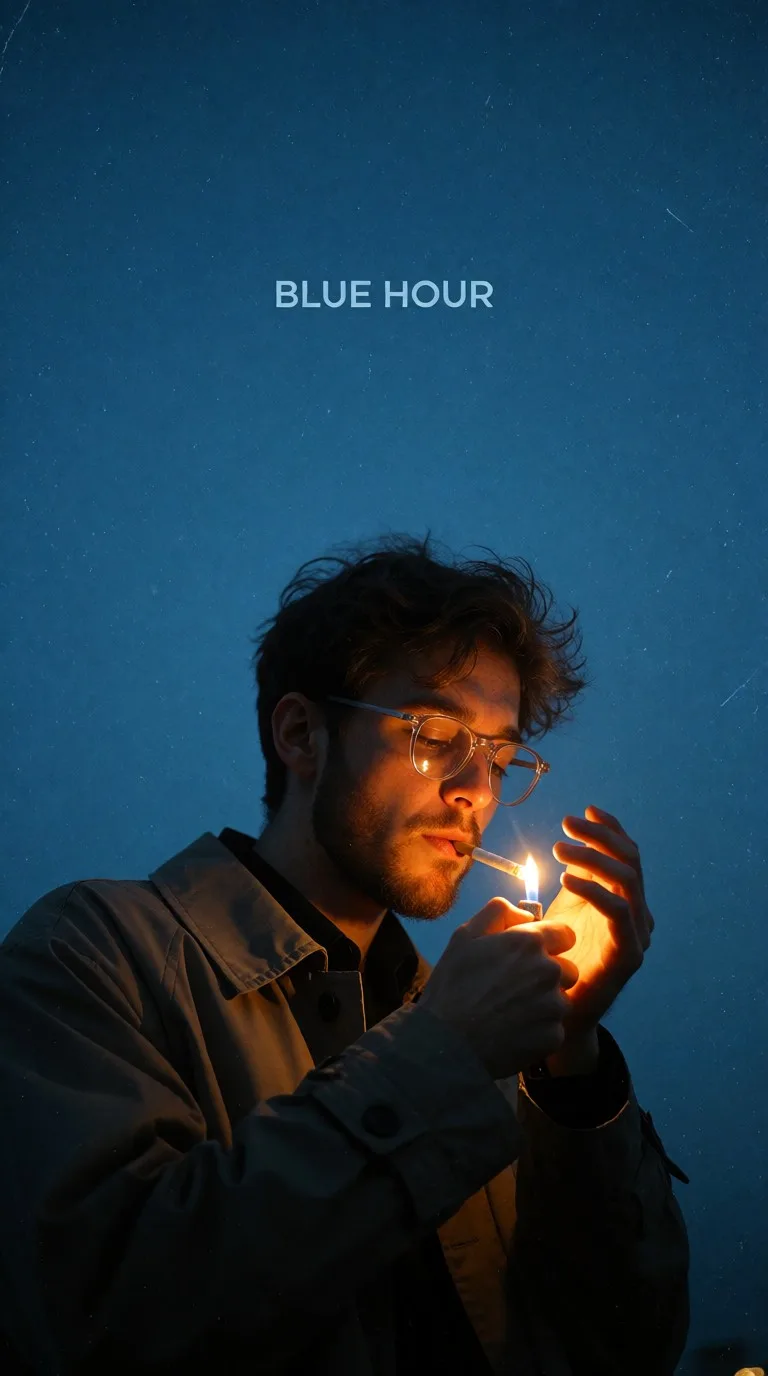
Blue Hour Flame
Quelle: @arhm_fx
Dieser Prompt erzeugt: Blue Hour Flame.
Geeignetes Modell: ChatGPT.
Aus dem Prompt lässt sich festhalten: blue hour.
Eine Variable, die du ändern kannst: Fotorealistisch look.
So verwendest du diesen Prompt
- Modell: ChatGPT.
- Motiv: Blue Hour Flame.
- Variable ändern: Fotorealistisch look.
0 Aufrufe · 0 Kopien · 0 Favoriten · 0 Diskussionen
0Prompt
Heute noch 1 von 1 kostenlosen Kopien
A dramatic, low-key portrait features a young man in mid-shot, positioned slightly off-center to the right, against a vast, deep blue background. The man has tousled brown hair, a short beard, and wears clear-framed round eyeglasses. He is captured in the act of lighting a cigarette held between his lips with a lighter in his left hand. An intense, warm orange-yellow flame emanates from the lighter, casting a strong, directional glow on the right side of his face, illuminating his cheekbone, the lenses of his glasses, and the cigarette. His right hand, positioned above the lighter, is also brightly illuminated by this warm light. He wears a collared, light-toned jacket or trench coat, with the left side of his body and clothing receding into deep shadow, creating a prominent chiaroscuro effect.
The background is a uniform, expansive field of deep, desaturated blue, characteristic of twilight or the "BLUE HOUR," and is subtly textured with fine, scattered grain or speckles. Centered in the upper portion of this blue expanse, the words "BLUE HOUR" are displayed in a clean, light-colored sans-serif typeface. The overall image presents a moody, contemplative, and cinematic aesthetic, emphasizing the striking contrast between the localized warm light source and the expansive, cool blue ambient tones, imbued with a vintage film-like quality.
Ähnliche Prompts

3D Pop-up Parents Day Card
3D 노트 위 꽃이 입체적으로 피어나는 장면, 첨부된 사진의 미니 캐릭터들이 물주고 가꾸는 모습, {argument name="날씨" default="따뜻한 5월 햇살"}, 캐리커처 스타일, 밝고 사랑스러운 분위기, 실제 꽃처럼 디테일하게,

Chibi Scrapbook Photo Transformation
remove the people around the main character, Add multiple small, cute chibi-style “mini versions” of her around the image.

AI Photo Generation Guide
1. Open Gemini / Grok / GPT Image 2.0 2. Upload your photo 3. Copy the prompt 4. Generate 5. Prompt ⤵️ https://t.co/ufvHABxbuM

Depth in Image Generation
🤯 Images 2.5 is so good at building depth!

AI Sticker-Cutout Photo Effect
How to get this viral sticker-cutout photo effect with AI GPT image 2 on chatgpt Prompt👇 https://t.co/Re6oPaU3zv

Photo made of words
Your photo, but made entirely from words 🤯👇 ① Open Gemini / Grok / GPT Image 2.0 ② Add your photo ③ Paste the prompt ④ Generate.

Photo to Hand-Drawn Art
Turn your photo into a hand-drawn masterpiece ✍️🖤 ① Upload your photo ② Copy this prompt ③ Generate ④ Done.

Rubber Stamp Travel Field Notes Poster
GPT image 2 on chatgpt Prompt👇 Please create a separate "Rubber Stamp Travel Field Notes Poster" for each photo I upload, outputting each

Event Photo Synthesis Illustration
Generate a single illustration based on the school trip photos.

Istanbul Travel Journal Collage
Image created on Gpt 2 Prompt: Ultra-realistic hand-painted watercolor travel collage with soft ink outlines, vintage travel journal

Indian Wedding Invitation Card
"एक भव्य भारतीय डिजिटल वेडिंग इनविटेशन कार्ड (Digital Wedding Invitation Card)। बैकग्राउंड में हल्के गुलाबी और सुनहरे रंग के पर्दे

Cat Ruins Photo
GPT Image 2 on ChatGPT Prompt: Use the uploaded reference image as the primary facial reference.