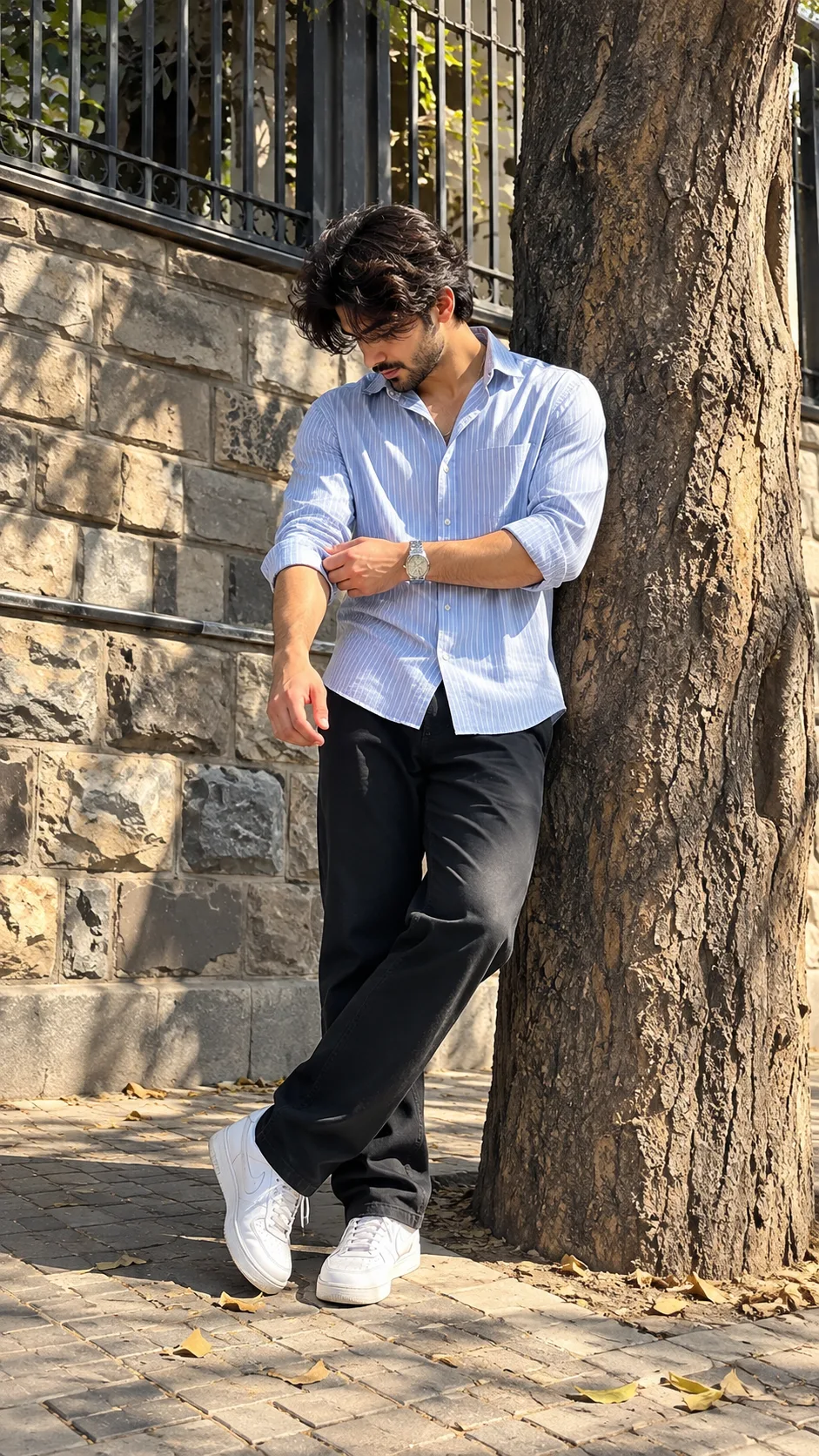
☀️📸 Men’s Casual Streetwear Photography – Outdoor Portrait & Natural Light
Quelle: @info_x_nik
Dieser Prompt erzeugt: ☀️📸 Men’s Casual Streetwear Photography – Outdoor Portrait & Natural Light.
Geeignetes Modell: ChatGPT.
Aus dem Prompt lässt sich festhalten: full body.
Eine Variable, die du ändern kannst: Fotorealistisch look.
So verwendest du diesen Prompt
- Modell: ChatGPT.
- Motiv: ☀️📸 Men’s Casual Streetwear Photography – Outdoor Portrait & Natural Light.
- Variable ändern: Fotorealistisch look.
0 Aufrufe · 0 Kopien · 0 Favoriten · 0 Diskussionen
0Prompt
Heute noch 1 von 1 kostenlosen Kopien
aspect ratio 9:16 , Keep the person exactly as shown in the reference image with 100% identical facial features, bone structure, 4K details, has perfect facial details as reference image,{
"category": "portrait_creator",
"category_reasoning": "Single person in casual styling posing for social content.",
"adaptable": "subject",
"subject": "Young man leaning against tree, adjusting his shirt sleeve.",
"subject_details": "Mid-20s, Light blue striped shirt, dark pants, white sneakers, silver watch.",
"setting": "Outdoor urban sidewalk near a tree, harsh midday sunlight.",
"setting_details": "Rough tree trunk, stone masonry wall, dark metal fencing, paved stone ground with scattered leaves.",
"composition": "Full body framing, slight low angle, centered subject leaning right.",
"camera": "Standard wide smartphone lens, deep depth of field.",
"lighting": "Hard direct sunlight from upper right, strong cast shadows on tree and wall.",
"color_grade": "Natural warm daylight, high contrast.",
"color_palette": "Light blue, dark black, warm browns, pale grey.",
"style": "Casual street style, creator content.",
"mood": "Casual, relaxed, confident.",
"textures_materials": "Rough tree bark, smooth cotton shirt, matte stone wall, leather sneakers.",
"post_processing": "Standard smartphone digital sharpening and contrast boost.",
"recreation_prompt": "Young man leaning against tree, adjusting his shirt sleeve, Full body framing, slight low angle, Hard direct sunlight from upper right, strong cast shadows, Natural warm daylight, high contrast, Casual street style, creator content, Standard wide smartphone lens, deep depth of field.",
"adaptation_prompt": "[YOUR SUBJECT - describe yourself: appearance, outfit, pose] leaning against tree, adjusting shirt sleeve, Full body framing, slight low angle, Hard direct sunlight, strong cast shadows, Natural warm daylight, Casual street style, Standard wide lens, deep depth of field.",
"negative_prompt": "distorted face, bad hands, flat lighting, blurry background, studio lighting.",
"color_science": "Warm daylight, neutral white balance, standard digital contrast.",
"filter_name": "Smartphone HDR",
"filter_description": "Standard smartphone image processing with lifted shadows and sharpened details.",
"white_balance": "Daylight",
"color_temperature": "Warm",
"tone_curve": "High contrast, crushed blacks.",
"dynamic_range": "Standard digital dynamic range.",
"highlight_rendering": "Bright, slight clipping on shirt.",
"shadow_rendering": "Deep, hard edges.",
"camera_rendering": "Standard smartphone perspective, wide field of view.",
"lens_rendering": "No noticeable distortion, deep focus.",
"noise_profile": "Clean, low noise.",
"grain_profile": "No film grain.",
"sharpness_profile": "Digitally sharpened edges.",
"retouching_analysis": "No obvious beauty retouching.",
"portrait_analysis": " looking directly to the camera.",
"facial_expression": "Neutral, focused on sleeve.",
"micro_expression": "Relaxed.",
"skin_rendering": "Natural texture, hard sunlight highlights.",
"hair_rendering": "Textured, specular highlights from sun.",
"lighting_analysis": "Key light is hard sun from top-right.",
"visual_style_analysis": "Instagram creator, casual streetwear."
}
Ähnliche Prompts

3D Pop-up Parents Day Card
3D 노트 위 꽃이 입체적으로 피어나는 장면, 첨부된 사진의 미니 캐릭터들이 물주고 가꾸는 모습, {argument name="날씨" default="따뜻한 5월 햇살"}, 캐리커처 스타일, 밝고 사랑스러운 분위기, 실제 꽃처럼 디테일하게,

Chibi Scrapbook Photo Transformation
remove the people around the main character, Add multiple small, cute chibi-style “mini versions” of her around the image.

AI Photo Generation Guide
1. Open Gemini / Grok / GPT Image 2.0 2. Upload your photo 3. Copy the prompt 4. Generate 5. Prompt ⤵️ https://t.co/ufvHABxbuM

Depth in Image Generation
🤯 Images 2.5 is so good at building depth!

AI Sticker-Cutout Photo Effect
How to get this viral sticker-cutout photo effect with AI GPT image 2 on chatgpt Prompt👇 https://t.co/Re6oPaU3zv

Photo made of words
Your photo, but made entirely from words 🤯👇 ① Open Gemini / Grok / GPT Image 2.0 ② Add your photo ③ Paste the prompt ④ Generate.

Photo to Hand-Drawn Art
Turn your photo into a hand-drawn masterpiece ✍️🖤 ① Upload your photo ② Copy this prompt ③ Generate ④ Done.

Rubber Stamp Travel Field Notes Poster
GPT image 2 on chatgpt Prompt👇 Please create a separate "Rubber Stamp Travel Field Notes Poster" for each photo I upload, outputting each

Event Photo Synthesis Illustration
Generate a single illustration based on the school trip photos.

Istanbul Travel Journal Collage
Image created on Gpt 2 Prompt: Ultra-realistic hand-painted watercolor travel collage with soft ink outlines, vintage travel journal

Indian Wedding Invitation Card
"एक भव्य भारतीय डिजिटल वेडिंग इनविटेशन कार्ड (Digital Wedding Invitation Card)। बैकग्राउंड में हल्के गुलाबी और सुनहरे रंग के पर्दे

Cat Ruins Photo
GPT Image 2 on ChatGPT Prompt: Use the uploaded reference image as the primary facial reference.