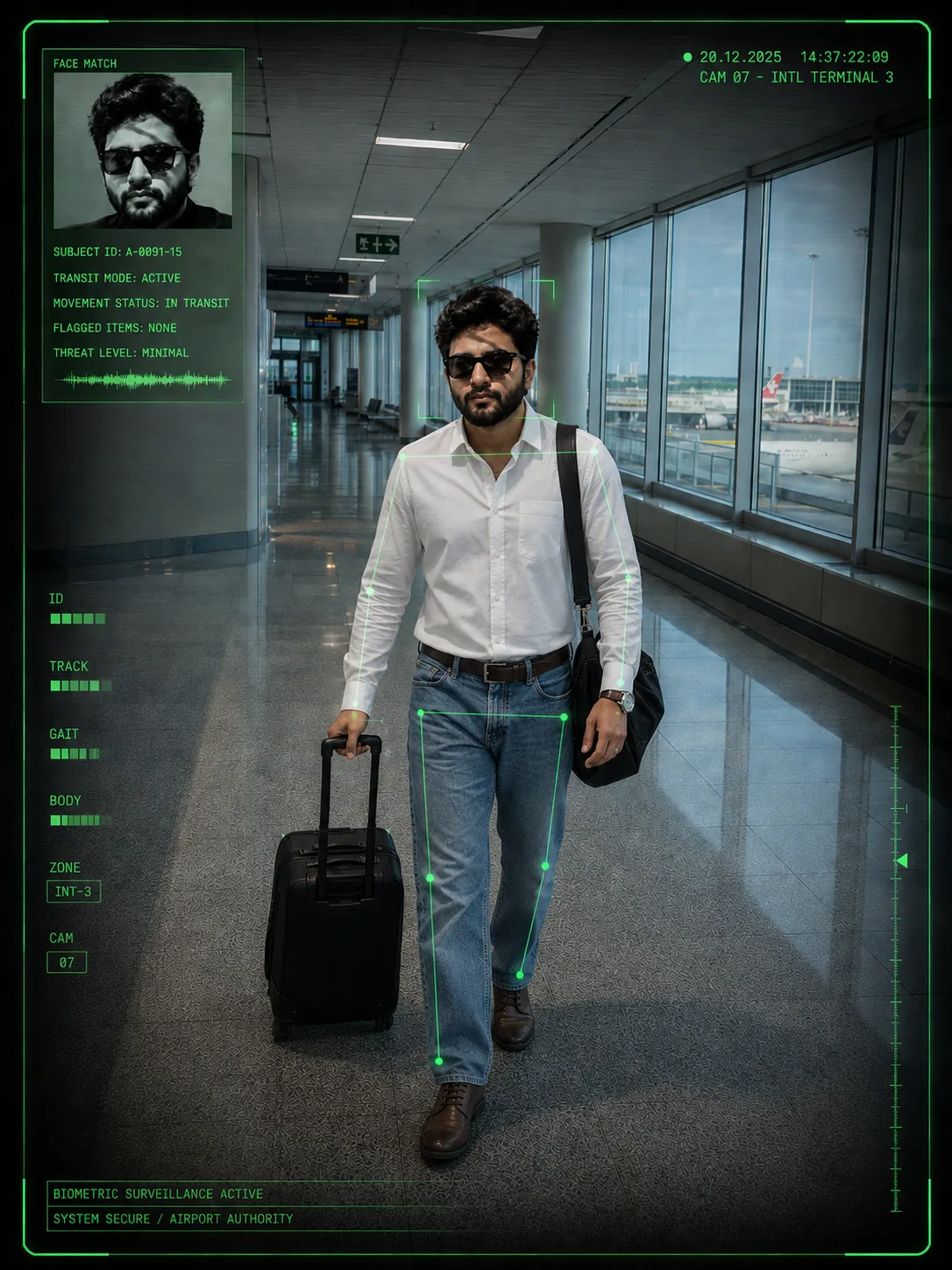
Biometric Surveillance in Terminal 3
来源: @rehman
这条提示词生成的画面:Biometric Surveillance in Terminal 3。
适用模型:ChatGPT。
可以改的一个变量:写实 look。
如何使用这条提示词
- 适用模型:ChatGPT。
- 画面主体:Biometric Surveillance in Terminal 3。
- 改一个变量:写实 look。
0 浏览 · 0 复制 · 0 收藏 · 0 讨论
0提示词
今日剩余 1 / 1 次免费复制
**IMPORTANT IDENTITY & FACE PRESERVATION — HIGHEST PRIORITY**

Use the **uploaded photo of the person as the ONLY identity and facial reference for the main subject**. Recreate the reference image's composition, camera perspective, environment, pose, clothing style, lighting, surveillance aesthetic, and HUD graphics, but replace the reference person completely with the person from the uploaded photo.

The uploaded person's face and identity must remain **fully recognizable and faithful to the original photo**. Do **not** redesign, beautify, alter, replace, or reinterpret the face.

Preserve the person's exact:

- Facial identity and likeness
- Face shape and facial proportions
- Forehead and hairline
- Eyes, eye shape, eyebrows, and natural eye spacing
- Nose shape and proportions
- Lips and mouth shape
- Cheekbones, cheeks, chin, and jawline
- Natural skin tone and complexion
- Hair texture, hairstyle, and hairline
- Facial hair, if present
- Distinctive facial characteristics
- Natural age and overall appearance

**Do not make the subject look like the person in the reference image.** The reference image is used only for the **scene, composition, styling, pose, environment, and visual aesthetic**. The uploaded person must remain the unmistakable identity of the final subject.

### SCENE & COMPOSITION

Create a **photorealistic airport surveillance-camera photograph** in a modern international airport terminal.

The main subject is walking directly toward the surveillance camera through a spacious, clean airport corridor. Use a **vertical full-body composition**, approximately **3:4 portrait framing**.

The airport has:

- Large floor-to-ceiling windows along the right side
- Bright daylight coming through the windows
- Visible airport tarmac/runway and aircraft-area structures outside
- Long glossy gray tiled flooring with realistic reflections
- Modern white and gray ceiling panels
- Long rectangular fluorescent/LED ceiling lights
- Clean contemporary architectural design
- Deep perspective leading toward the distant terminal interior
- Subtle airport signage and distant architectural details

### SUBJECT

Place the uploaded person naturally in the center of the frame, walking toward the camera while pulling a **small black rolling suitcase** with one hand.

The subject should have a relaxed, realistic walking posture and natural body proportions.

Recreate the overall outfit styling from the reference:

- Fitted white sleeveless/casual crop-style top
- Loose-fitting blue denim jeans
- Dark footwear
- Casual travel styling
- Dark shoulder/crossbody bag
- Minimal everyday accessories

The clothing should look **realistic, naturally fitted to the uploaded person's body**, with authentic fabric texture, folds, seams, and lighting.

Do not copy the reference person's facial appearance. The **uploaded person remains the subject**.

### CAMERA & SURVEILLANCE LOOK

Make the image look like it was captured by a **high-quality airport security/surveillance camera** rather than a normal portrait camera.

Use:

- Slightly elevated surveillance-camera viewpoint
- Wide-angle security-camera perspective
- Full-body framing
- Mild lens distortion
- Realistic CCTV sharpness
- Slight digital surveillance-camera texture
- Neutral daylight-balanced exposure
- Natural shadows
- Realistic reflections on the polished floor
- Photorealistic details without excessive cinematic blur

The image should feel like an authentic **classified airport monitoring feed**.

### GREEN SECURITY HUD OVERLAY

Add a sophisticated **green biometric surveillance HUD/interface overlay** around the photograph.

Include thin neon-green tracking lines and corner brackets around the main subject, with subtle body/face detection points and connecting lines.

In the upper-left corner, add a small **facial-recognition identification panel** containing a monochrome/grayscale biometric portrait derived from the **uploaded person's actual face**, not the reference person's face.

The biometric inset must preserve the same identity as the uploaded person.

Add believable fictional surveillance text such as:

`SUBJECT ID: A-0091-15`

`TRANSIT MODE: ACTIVE`

`MOVEMENT STATUS: IN TRANSIT`

`FLAGGED ITEMS: NONE`

`THREAT LEVEL: MINIMAL`

Add a small green timestamp/interface indicator in the upper-right area, visually similar to a security monitoring system.

Use subtle labels such as:
`FACE MATCH`
`ID`
`TRACK`
`GAIT`
`BODY`
`ZONE`
`CAM`

Keep the HUD **thin, technical, translucent, and realistic**, not oversized or distracting.

### BORDER & GRAPHIC DESIGN

Surround the image with a thin **black outer border** and a precise **neon-green rectangular surveillance frame** slightly inside the edges.

The overall design should resemble a futuristic airport security monitoring screenshot combined with a realistic CCTV frame.

### LIGHTING & COLOR

Use bright natural daylight from the airport windows, balanced with cool neutral indoor lighting.

Color palette:

- Cool gray airport architecture
- Neutral white lighting
- Natural skin tones
- Blue denim
- White top
- Dark luggage and accessories
- Thin neon-green HUD graphics

Maintain realistic dynamic range and photographic exposure.

### REALISM REQUIREMENTS

Ultra-photorealistic, highly detailed, realistic human anatomy, authentic airport architecture, natural fabric texture, physically accurate lighting, realistic floor reflections, believable surveillance-camera perspective, subtle digital noise, sharp environmental details, natural skin texture.

**Most important:** the person's identity must come exclusively from the uploaded image. Do not merge the uploaded person's face with the reference person's face. Do not change facial structure, ethnicity, age, distinctive features, or recognizable likeness. The final image should look like **the exact uploaded person photographed walking through this airport under a biometric CCTV surveillance system**.

**Aspect ratio: 3:4 vertical.**
相似提示词

3D Pop-up Parents Day Card
3D 노트 위 꽃이 입체적으로 피어나는 장면, 첨부된 사진의 미니 캐릭터들이 물주고 가꾸는 모습, {argument name="날씨" default="따뜻한 5월 햇살"}, 캐리커처 스타일, 밝고 사랑스러운 분위기, 실제 꽃처럼 디테일하게,

Chibi Scrapbook Photo Transformation
remove the people around the main character, Add multiple small, cute chibi-style “mini versions” of her around the image.

AI Photo Generation Guide
1. Open Gemini / Grok / GPT Image 2.0 2. Upload your photo 3. Copy the prompt 4. Generate 5. Prompt ⤵️ https://t.co/ufvHABxbuM

Depth in Image Generation
🤯 Images 2.5 is so good at building depth!

AI Sticker-Cutout Photo Effect
How to get this viral sticker-cutout photo effect with AI GPT image 2 on chatgpt Prompt👇 https://t.co/Re6oPaU3zv

Photo made of words
Your photo, but made entirely from words 🤯👇 ① Open Gemini / Grok / GPT Image 2.0 ② Add your photo ③ Paste the prompt ④ Generate.

Photo to Hand-Drawn Art
Turn your photo into a hand-drawn masterpiece ✍️🖤 ① Upload your photo ② Copy this prompt ③ Generate ④ Done.

Rubber Stamp Travel Field Notes Poster
GPT image 2 on chatgpt Prompt👇 Please create a separate "Rubber Stamp Travel Field Notes Poster" for each photo I upload, outputting each

Event Photo Synthesis Illustration
Generate a single illustration based on the school trip photos.

Istanbul Travel Journal Collage
Image created on Gpt 2 Prompt: Ultra-realistic hand-painted watercolor travel collage with soft ink outlines, vintage travel journal

Indian Wedding Invitation Card
"एक भव्य भारतीय डिजिटल वेडिंग इनविटेशन कार्ड (Digital Wedding Invitation Card)। बैकग्राउंड में हल्के गुलाबी और सुनहरे रंग के पर्दे

Cat Ruins Photo
GPT Image 2 on ChatGPT Prompt: Use the uploaded reference image as the primary facial reference.