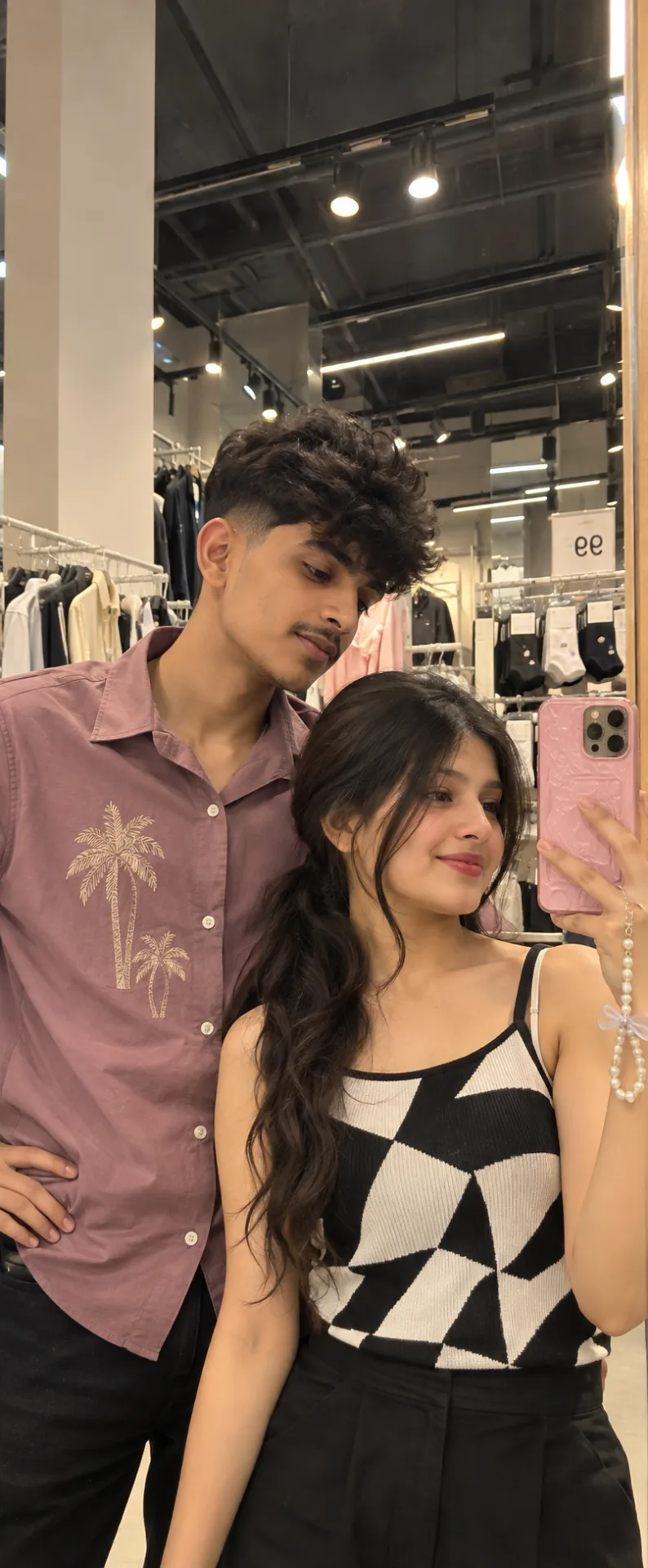
🪞📱 Casual Couple Mirror Selfie – Natural Instagram Photo & Pose Ideas
来源: @info_x_nik
这条提示词生成的画面:🪞📱 Casual Couple Mirror Selfie – Natural Instagram Photo & Pose Ideas。
适用模型:ChatGPT。
可以从提示词确定的画面信息:overhead。
可以改的一个变量:写实 look。
如何使用这条提示词
- 适用模型:ChatGPT。
- 画面主体:🪞📱 Casual Couple Mirror Selfie – Natural Instagram Photo & Pose Ideas。
- 改一个变量:写实 look。
0 浏览 · 0 复制 · 0 收藏 · 0 讨论
0提示词
今日剩余 1 / 1 次免费复制
aspect ratio 9:16 , Keep the person exactly as shown in the reference image with 100% identical facial features, bone structure, 4K details, has perfect facial details as reference image,{
"category": "portrait_creator",
"category_reasoning": "The image is a casual mirror selfie featuring two individuals, representing typical social media content.",
"adaptable": "subject",
"subject": "A young woman holding a smartphone taking a mirror selfie, and a young man standing closely behind her looking downward.",
"subject_details": "Woman: late teens or early 20s, long dark wavy hair tied back, slight closed-mouth smile, wearing a black and white geometric patterned sleeveless top, holding a phone with a textured pink case and pearl wrist strap. Man: early 20s, dark curly hair with faded sides, slight mustache, wearing a mauve button-down shirt with palm tree embroidery on the right chest.",
"setting": "Indoor retail store environment under artificial overhead lighting.",
"setting_details": "Blurred clothing racks, dark industrial ceiling with linear LED fixtures and circular track lights, a white square sign displaying socks and the number 99, edge of the mirror visible.",
"composition": "Medium close-up framing, eye-level mirror reflection, subjects centered, deep background with ceiling lights forming subtle leading lines.",
"camera": "Smartphone camera reflection, wide-angle lens character, deep depth of field keeping both foreground subjects and background elements relatively in focus.",
"lighting": "Overhead artificial retail lighting acting as multiple hard spotlights, providing flat and somewhat harsh downward illumination with minor ambient fill.",
"color_grade": "Warm-tungsten balance, faded blacks, slightly muted overall saturation.",
"color_palette": "Mauve, black, white, gray, warm beige.",
"style": "Casual lifestyle, social media selfie, everyday documentation.",
"mood": "Casual, relaxed, intimate.",
"textures_materials": "Matte cotton shirt, plastic phone case with textured bumps, glossy pearl strap, smooth mirror surface, skin.",
"post_processing": "Smartphone auto-processing, slight skin smoothing filter, mild digital noise in shadow areas.",
"recreation_prompt": "A young woman taking a mirror selfie holding a smartphone with a textured pink case and pearl strap, wearing a black and white geometric sleeveless top, a young man standing closely beside her wearing a mauve button-down shirt with palm tree embroidery looking down, retail clothing store background with track lighting and a price sign, medium close-up, wide-angle smartphone reflection, deep depth of field, overhead artificial retail lighting, warm-tungsten balance, casual social media style, slight skin smoothing, digital photography.",
"adaptation_prompt": "[YOUR SUBJECT — describe yourself: appearance, outfit, pose] taking a mirror selfie holding a smartphone with a textured pink case and pearl strap, a young man standing closely beside her wearing a mauve button-down shirt with palm tree embroidery looking down, retail clothing store background with track lighting and a price sign, medium close-up, wide-angle smartphone reflection, deep depth of field, overhead artificial retail lighting, warm-tungsten balance, casual social media style, slight skin smoothing, digital photography.",
"negative_prompt": "cinematic lighting, professional studio setup, overexposed highlights, blurry faces, distorted hands, extreme low-key, high contrast.",
"color_science": "Warm retail daylight balance, lifted blacks, mild skin smoothing color preservation, neutral-to-warm highlights.",
"filter_name": "Smartphone Auto Beauty Filter",
"filter_description": "Mild skin smoothing, soft digital sharpening, lifted shadows, slight warm tint, standard front-facing smartphone camera auto-processing.",
"white_balance": "Warm / Tungsten mix",
"color_temperature": "Warm",
"tone_curve": "Lifted shadows, slightly compressed highlights",
"dynamic_range": "Standard digital SDR",
"highlight_rendering": "Slightly bloomed from overhead track lights",
"shadow_rendering": "Lifted with mild color noise",
"camera_rendering": "Smartphone sensor, deep focus",
"lens_rendering": "Wide-angle, mild edge distortion",
"noise_profile": "Mild digital luminance noise in darker background areas",
"grain_profile": "",
"sharpness_profile": "Digital sharpening on faces, softer background resolution",
"retouching_analysis": "Automated digital skin softening",
"portrait_analysis": "Casual poses, woman looking at screen/mirror, man looking down",
"facial_expression": "Woman exhibits a subtle closed-mouth smile; man has a relaxed neutral expression looking downward.",
"micro_expression": "Relaxed facial muscles, natural resting state for both subjects.",
"skin_rendering": "Softened skin texture, lack of prominent pores due to digital filtering, flat overhead lighting.",
"hair_rendering": "High contrast dark hair, visible curls on the man with soft edges.",
"lighting_analysis": "Overhead spot lighting causing uneven facial shadows, multiple overhead light sources creating mixed shadows under chin and nose.",
"visual_style_analysis": "Instagram creator, casual social media UGC, everyday snapshot"
}
相似提示词

3D Pop-up Parents Day Card
3D 노트 위 꽃이 입체적으로 피어나는 장면, 첨부된 사진의 미니 캐릭터들이 물주고 가꾸는 모습, {argument name="날씨" default="따뜻한 5월 햇살"}, 캐리커처 스타일, 밝고 사랑스러운 분위기, 실제 꽃처럼 디테일하게,

Chibi Scrapbook Photo Transformation
remove the people around the main character, Add multiple small, cute chibi-style “mini versions” of her around the image.

AI Photo Generation Guide
1. Open Gemini / Grok / GPT Image 2.0 2. Upload your photo 3. Copy the prompt 4. Generate 5. Prompt ⤵️ https://t.co/ufvHABxbuM

Depth in Image Generation
🤯 Images 2.5 is so good at building depth!

AI Sticker-Cutout Photo Effect
How to get this viral sticker-cutout photo effect with AI GPT image 2 on chatgpt Prompt👇 https://t.co/Re6oPaU3zv

Photo made of words
Your photo, but made entirely from words 🤯👇 ① Open Gemini / Grok / GPT Image 2.0 ② Add your photo ③ Paste the prompt ④ Generate.

Photo to Hand-Drawn Art
Turn your photo into a hand-drawn masterpiece ✍️🖤 ① Upload your photo ② Copy this prompt ③ Generate ④ Done.

Rubber Stamp Travel Field Notes Poster
GPT image 2 on chatgpt Prompt👇 Please create a separate "Rubber Stamp Travel Field Notes Poster" for each photo I upload, outputting each

Event Photo Synthesis Illustration
Generate a single illustration based on the school trip photos.

Istanbul Travel Journal Collage
Image created on Gpt 2 Prompt: Ultra-realistic hand-painted watercolor travel collage with soft ink outlines, vintage travel journal

Indian Wedding Invitation Card
"एक भव्य भारतीय डिजिटल वेडिंग इनविटेशन कार्ड (Digital Wedding Invitation Card)। बैकग्राउंड में हल्के गुलाबी और सुनहरे रंग के पर्दे

Cat Ruins Photo
GPT Image 2 on ChatGPT Prompt: Use the uploaded reference image as the primary facial reference.