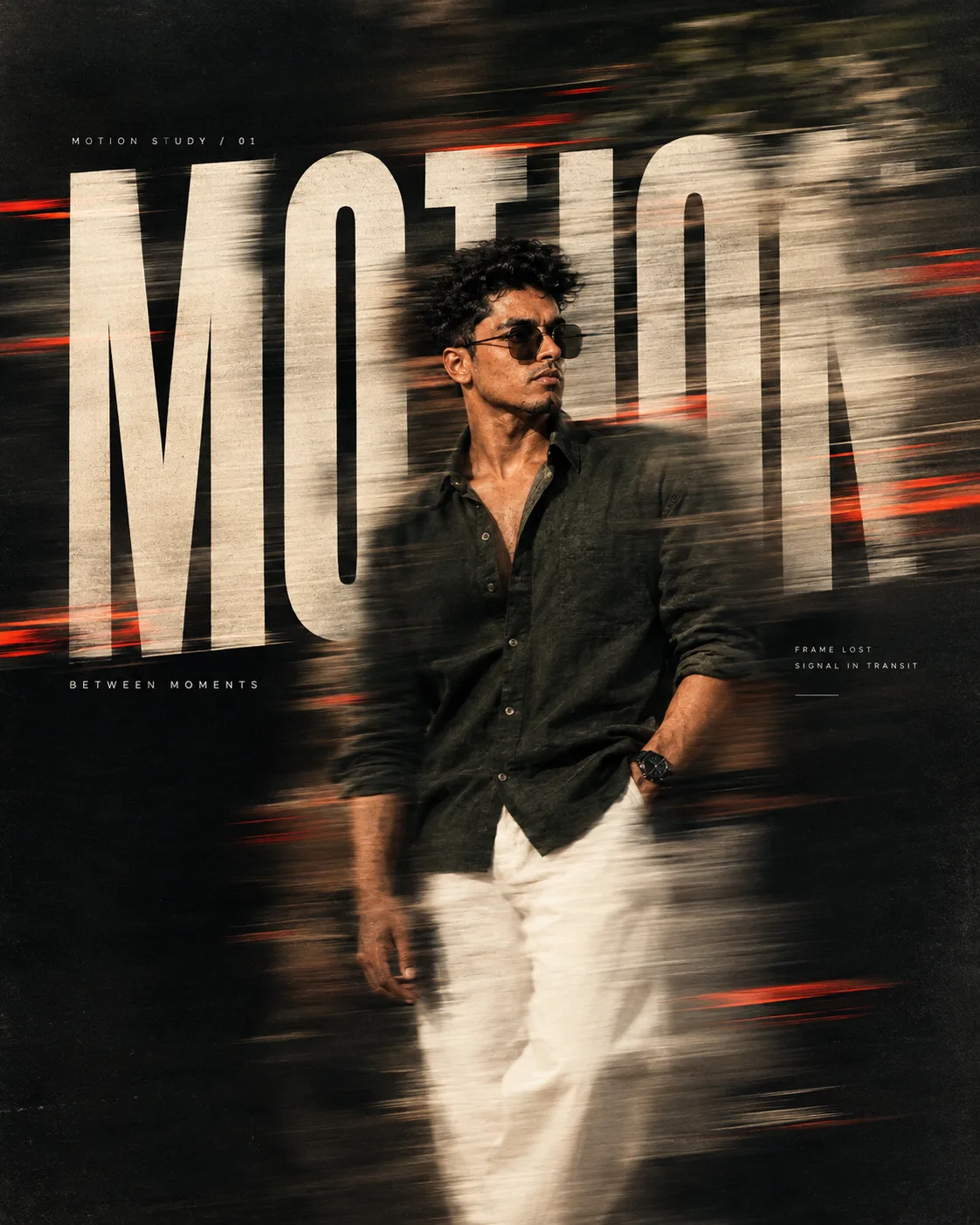
Create a Premium realistic fashion/editorial poster
来源: @sumi_t1431611
这条提示词生成的画面:Create a Premium realistic fashion/editorial poster。
适用模型:ChatGPT。
可以从提示词确定的画面信息:rim light。
可以改的一个变量:写实 look。
如何使用这条提示词
- 适用模型:ChatGPT。
- 画面主体:Create a Premium realistic fashion/editorial poster。
- 改一个变量:写实 look。
0 浏览 · 0 复制 · 0 收藏 · 0 讨论
0提示词
今日剩余 1 / 1 次免费复制
Create a premium, realistic fashion/editorial poster with a powerful photographic motion-smudge effect and integrated experimental typography.MAIN CONCEPTA single human subject is captured as the sharp visual anchor while parts of their body, clothing, silhouette, and surrounding environment dissolve into realistic directional motion blur and physical photographic smears.The effect should feel like the camera captured movement during a slow shutter exposure — not like a digital glitch effect.Create elongated motion trails, subtle ghosting, stretched textures, directional smears, and fragmented afterimages. The movement should follow one consistent direction, creating a believable sense of speed and energy.Keep approximately 40–60% of the main subject sharp and recognizable, while the remaining areas gradually dissolve into motion.Do not show unnecessary distortion of anatomy.MOTION / SMUDGE EFFECTUse realistic:horizontal motion smearslong-exposure directional blursubtle ghosted afterimagesstretched fabric trailsdragged shadowssoft chromatic separation at the edgessubtle double exposurerealistic camera movementmotion streaks fading naturally into the backgroundThe smudge should appear strongest around:edges of the bodyarms and clothinghairshoulderssilhouettetypographyThe central visual anchor remains sharp.The blur gradually increases outward, creating a transition:SHARP → SOFT GHOSTING → STRETCHED SMEAR → DISSOLUTIONTYPOGRAPHYIntegrate one large main title directly into the composition:[INSERT TITLE]Use extremely bold, tall, condensed, modern sans-serif typography.The typography must physically interact with the motion effect.Parts of the letters should:remain perfectly sharpstretch horizontally with the movementpartially smear into thin linesdissolve into motion trailsbecome slightly duplicated through ghostingfade naturally into the backgroundThe text should feel as though it is being pulled through time and motion.Do not create unreadable typography.Maintain approximately 70% readability, while allowing the remaining parts to distort artistically.Use dramatic scale.The title should occupy approximately 40–70% of the composition, depending on the layout.Typography may extend beyond the canvas and crop naturally at the edges.Add one small subtitle:[INSERT SHORT PHRASE]Use a thin, clean modern grotesk font with wide letter spacing.Keep the subtitle sharp and stable to contrast against the distorted main typography.Optional subtle micro-text:MOTION STUDY / 01
FRAME LOST
SIGNAL IN TRANSIT
BETWEEN MOMENTSKeep these details minimal and low-contrast.COMPOSITIONVertical 4:5 or 9:16 composition.Create one clear visual anchor.Use strong negative space.Follow a refined editorial grid.Allow the motion direction to guide the viewer's eye through the composition.The subject and typography should overlap naturally.Create depth using:foreground motion trails
sharp subject
blurred secondary forms
subtle typography layers
minimal atmospheric backgroundThe composition should feel intentional, clean, and professionally art-directed.VISUAL STYLEPhotorealistic editorial photography
Experimental fashion campaign
Slow-shutter photography
Contemporary graphic design
Swiss-inspired typography
Japanese editorial minimalism
Luxury magazine art direction
Fine-art photography
Realistic motion studyThe final result should look like a real high-end fashion campaign photographed with intentional camera movement, then combined with sophisticated graphic design.Avoid obvious AI-generated effects.LIGHTINGCinematic soft directional lighting.One primary light source.Subtle rim lighting to separate the sharp subject from the motion trails.Realistic shadows.Soft highlights.Natural exposure imperfections.Subtle bloom.No excessive glow.COLOR PALETTEUse a controlled palette:Dominant: deep black / charcoal / muted greySecondary: warm ivory / dirty whiteAccent: [INSERT ONE ACCENT COLOR — muted red, electric blue, burnt orange, or acid green]Keep saturation restrained.Use the accent color only inside selected motion trails, typography fragments, or small environmental details.TEXTURE & FINISHFine cinematic film grain.Subtle photographic noise.Soft lens imperfections.Slight motion-induced chromatic aberration.Matte editorial finish.Paper texture at very low opacity.Realistic fabric details.Natural skin texture.Premium print-quality composition.FINAL VISUAL CHARACTERThe final artwork should communicate:MOVEMENT / DISTORTION / MEMORY / SPEED / IDENTITY IN TRANSITIONOne moment is sharp.Everything around it is moving.The subject appears caught between two moments in time.The typography is not simply placed on top of the photograph — it is physically affected by the same motion, stretching and dissolving with the image.Photorealistic, sophisticated, cinematic, experimental, minimal, high-fashion editorial, professional graphic design, gallery-quality artwork, realistic photography, ultra-detailed, premium visual hierarchy.NEGATIVE PROMPTCartoon, anime, excessive digital glitch, pixelated distortion, unreadable typography, duplicated body, extra limbs, deformed anatomy, melted face, distorted hands, plastic skin, unrealistic motion, random blur, blurry entire image, oversaturated colors, excessive neon, cluttered composition, excessive text, watermark, logo, low resolution, AI artifacts, cheap poster design.
相似提示词

3D Pop-up Parents Day Card
3D 노트 위 꽃이 입체적으로 피어나는 장면, 첨부된 사진의 미니 캐릭터들이 물주고 가꾸는 모습, {argument name="날씨" default="따뜻한 5월 햇살"}, 캐리커처 스타일, 밝고 사랑스러운 분위기, 실제 꽃처럼 디테일하게,

Chibi Scrapbook Photo Transformation
remove the people around the main character, Add multiple small, cute chibi-style “mini versions” of her around the image.

AI Photo Generation Guide
1. Open Gemini / Grok / GPT Image 2.0 2. Upload your photo 3. Copy the prompt 4. Generate 5. Prompt ⤵️ https://t.co/ufvHABxbuM

Depth in Image Generation
🤯 Images 2.5 is so good at building depth!

AI Sticker-Cutout Photo Effect
How to get this viral sticker-cutout photo effect with AI GPT image 2 on chatgpt Prompt👇 https://t.co/Re6oPaU3zv

Photo made of words
Your photo, but made entirely from words 🤯👇 ① Open Gemini / Grok / GPT Image 2.0 ② Add your photo ③ Paste the prompt ④ Generate.

Photo to Hand-Drawn Art
Turn your photo into a hand-drawn masterpiece ✍️🖤 ① Upload your photo ② Copy this prompt ③ Generate ④ Done.

Rubber Stamp Travel Field Notes Poster
GPT image 2 on chatgpt Prompt👇 Please create a separate "Rubber Stamp Travel Field Notes Poster" for each photo I upload, outputting each

Event Photo Synthesis Illustration
Generate a single illustration based on the school trip photos.

Istanbul Travel Journal Collage
Image created on Gpt 2 Prompt: Ultra-realistic hand-painted watercolor travel collage with soft ink outlines, vintage travel journal

Indian Wedding Invitation Card
"एक भव्य भारतीय डिजिटल वेडिंग इनविटेशन कार्ड (Digital Wedding Invitation Card)। बैकग्राउंड में हल्के गुलाबी और सुनहरे रंग के पर्दे

Cat Ruins Photo
GPT Image 2 on ChatGPT Prompt: Use the uploaded reference image as the primary facial reference.