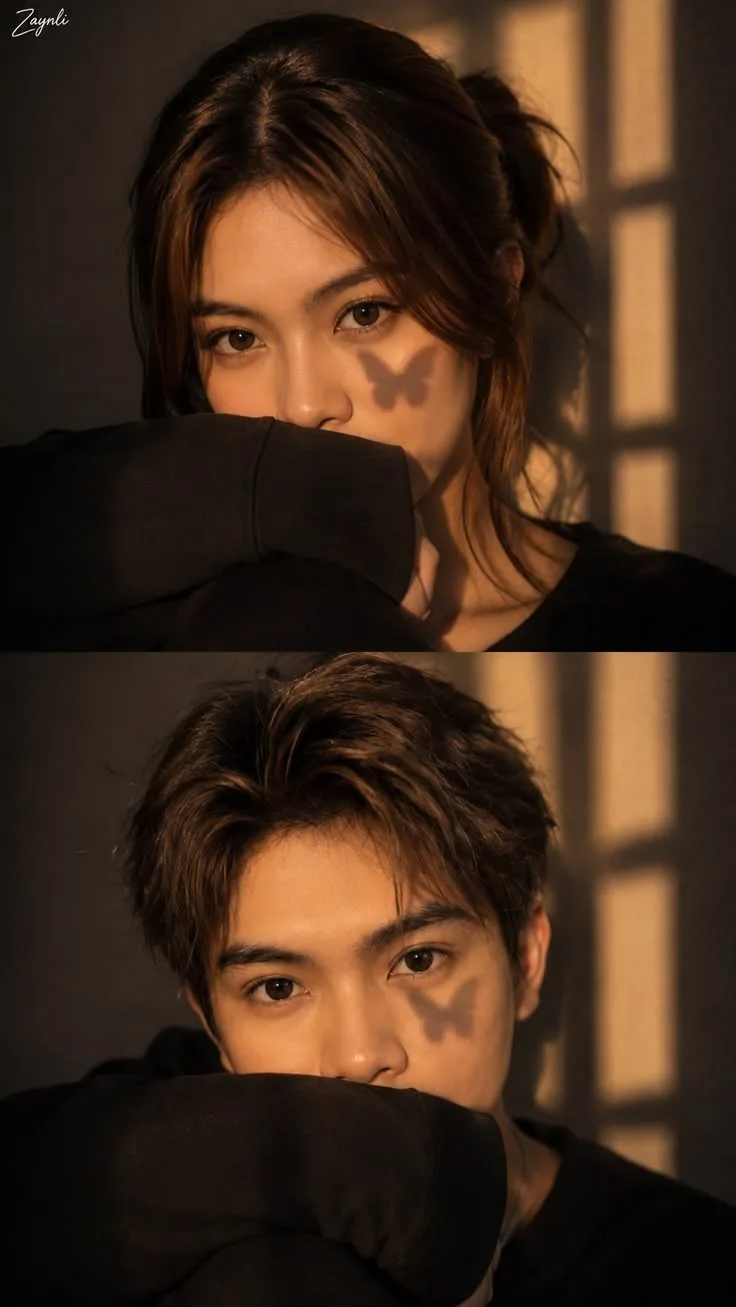
🦋🌅 Golden Hour Butterfly Shadow Portrait 🖤✨📸
来源: @uikey___creator999
这条提示词生成的画面:🦋🌅 Golden Hour Butterfly Shadow Portrait 🖤✨📸。
适用模型:ChatGPT。
可以从提示词确定的画面信息:close-up。
可以改的一个变量:写实 look。
如何使用这条提示词
- 适用模型:ChatGPT。
- 画面主体:🦋🌅 Golden Hour Butterfly Shadow Portrait 🖤✨📸。
- 改一个变量:写实 look。
0 浏览 · 0 复制 · 0 收藏 · 0 讨论
0提示词
今日剩余 1 / 1 次免费复制
{
  "design_type": "cinematic_two_panel_portrait",
  "aspect_ratio": "9:16",
  "layout": {
    "format": "two vertically stacked close-up portraits",
    "panels": 2,
    "separator": "thin horizontal division",
    "style": "aesthetic editorial photo collage"
  },
  "overall_style": {
    "mood": "warm, intimate, dreamy, soft and mysterious",
    "aesthetic": "golden-hour cinematic indoor portrait",
    "color_grade": "warm amber, brown, black and golden tones",
    "finish": "photorealistic with subtle film texture"
  },
  "background": {
    "setting": "dark minimal indoor room",
    "wall": "warm dark brown wall",
    "window": {
      "position": "right side",
      "effect": "strong rectangular sunlight patterns projected onto the wall and face"
    },
    "lighting": "low-key natural sunlight with dramatic window shadows"
  },
  "subject": {
    "panel_1": {
      "gender": "female",
      "framing": "tight close-up portrait",
      "pose": "face partially hidden behind the raised sleeve/arm",
      "gaze": "looking directly toward the camera",
      "expression": "soft, calm and slightly mysterious",
      "hair": {
        "color": "dark brown",
        "style": "long hair pulled loosely back",
        "front": "center-parted with soft face-framing strands"
      },
      "clothing": {
        "type": "black long-sleeve top",
        "sleeve": "oversized sleeve raised across the lower face"
      }
    },
    "panel_2": {
      "gender": "male",
      "framing": "tight close-up portrait",
      "pose": "face partially hidden behind the raised sleeve/arm",
      "gaze": "looking directly toward the camera",
      "expression": "calm and serious",
      "hair": {
        "color": "dark brown",
        "style": "short, naturally tousled hair",
        "finish": "soft textured strands"
      },
      "clothing": {
        "type": "black long-sleeve top",
        "sleeve": "oversized sleeve covering the lower portion of the face"
      }
    }
  },
  "special_effect": {
    "shadow": {
      "shape": "small butterfly silhouette",
      "position": "on the right cheek and lower eye area",
      "appearance": "sharp but soft-edged natural shadow",
      "source": "sunlight passing through a butterfly-shaped object or decoration"
    }
  },
  "lighting": {
    "source": "warm sunlight entering through a window",
    "direction": "from upper-right side",
    "quality": "soft but directional",
    "temperature": "warm golden amber",
    "contrast": "medium-high",
    "shadows": "deep, cinematic and natural",
    "highlight": "gentle golden illumination across the eyes, forehead and cheeks"
  },
  "composition": {
    "camera_angle": "straight-on close-up",
    "subject_position": "centered",
    "focus": "eyes and facial features",
    "depth_of_field": "shallow",
    "background": "softly darkened and unobtrusive",
    "symmetry": "minimal symmetrical portrait framing"
  },
  "camera_style": {
    "camera": "professional DSLR or mirrorless",
    "lens": "85mm portrait lens",
    "aperture": "wide aperture",
    "focus": "sharp eyes with soft surrounding details",
    "photography_style": "cinematic editorial portrait photography",
    "quality": "ultra-realistic high resolution"
  },
  "color_palette": [
    "warm amber",
    "golden brown",
    "dark chocolate brown",
    "black",
    "soft beige"
  ],
  "editing": {
    "contrast": "moderate-high",
    "saturation": "slightly muted",
    "highlights": "warm golden",
    "shadows": "deep brown-black",
    "grain": "subtle cinematic film grain",
    "skin": "natural realistic texture",
    "retouching": "minimal and realistic",
    "overall_finish": "soft vintage cinematic aesthetic"
  },
  "negative_prompt": [
    "blurry eyes",
    "distorted face",
    "asymmetrical eyes",
    "extra fingers",
    "extra limbs",
    "deformed hands",
    "unnatural skin",
    "plastic skin",
    "over-smoothed face",
    "harsh artificial lighting",
    "overexposure",
    "oversaturated colors",
    "cartoon style",
    "low resolution",
    "watermark",
    "random text",
    "unwanted objects"
  ]
}
相似提示词

3D Pop-up Parents Day Card
3D 노트 위 꽃이 입체적으로 피어나는 장면, 첨부된 사진의 미니 캐릭터들이 물주고 가꾸는 모습, {argument name="날씨" default="따뜻한 5월 햇살"}, 캐리커처 스타일, 밝고 사랑스러운 분위기, 실제 꽃처럼 디테일하게,

Chibi Scrapbook Photo Transformation
remove the people around the main character, Add multiple small, cute chibi-style “mini versions” of her around the image.

AI Photo Generation Guide
1. Open Gemini / Grok / GPT Image 2.0 2. Upload your photo 3. Copy the prompt 4. Generate 5. Prompt ⤵️ https://t.co/ufvHABxbuM

Depth in Image Generation
🤯 Images 2.5 is so good at building depth!

AI Sticker-Cutout Photo Effect
How to get this viral sticker-cutout photo effect with AI GPT image 2 on chatgpt Prompt👇 https://t.co/Re6oPaU3zv

Photo made of words
Your photo, but made entirely from words 🤯👇 ① Open Gemini / Grok / GPT Image 2.0 ② Add your photo ③ Paste the prompt ④ Generate.

Photo to Hand-Drawn Art
Turn your photo into a hand-drawn masterpiece ✍️🖤 ① Upload your photo ② Copy this prompt ③ Generate ④ Done.

Rubber Stamp Travel Field Notes Poster
GPT image 2 on chatgpt Prompt👇 Please create a separate "Rubber Stamp Travel Field Notes Poster" for each photo I upload, outputting each

Event Photo Synthesis Illustration
Generate a single illustration based on the school trip photos.

Istanbul Travel Journal Collage
Image created on Gpt 2 Prompt: Ultra-realistic hand-painted watercolor travel collage with soft ink outlines, vintage travel journal

Indian Wedding Invitation Card
"एक भव्य भारतीय डिजिटल वेडिंग इनविटेशन कार्ड (Digital Wedding Invitation Card)। बैकग्राउंड में हल्के गुलाबी और सुनहरे रंग के पर्दे

Cat Ruins Photo
GPT Image 2 on ChatGPT Prompt: Use the uploaded reference image as the primary facial reference.