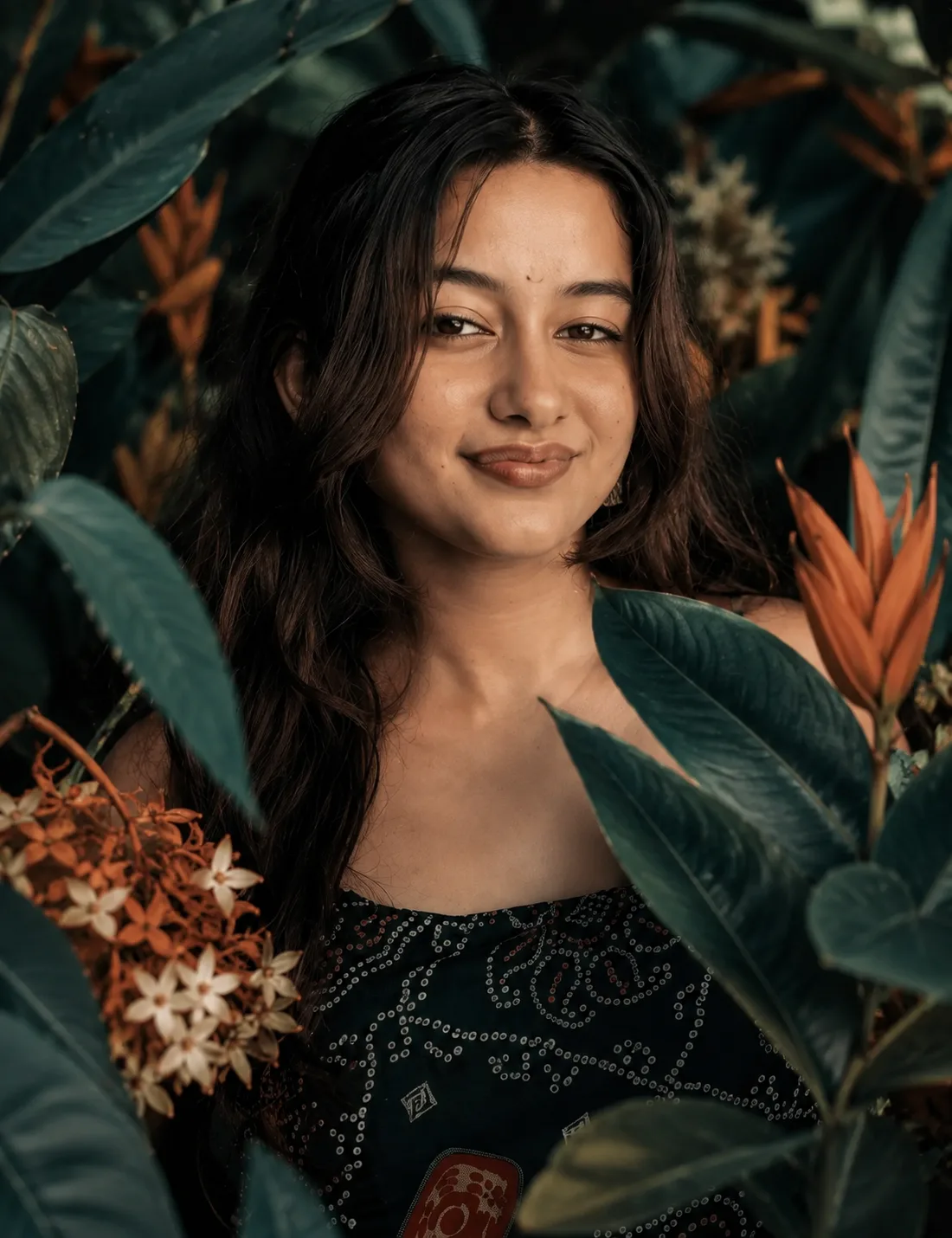
Jungle Portrait Among Tropical Blooms
来源: @rehman
这条提示词生成的画面:Jungle Portrait Among Tropical Blooms。
适用模型:ChatGPT。
可以从提示词确定的画面信息:close-up。
可以改的一个变量:写实 look。
如何使用这条提示词
- 适用模型:ChatGPT。
- 画面主体:Jungle Portrait Among Tropical Blooms。
- 改一个变量:写实 look。
0 浏览 · 0 复制 · 0 收藏 · 0 讨论
0提示词
今日剩余 1 / 1 次免费复制
### IMPORTANT IDENTITY & FACE PRESERVATION INSTRUCTION

Use the **uploaded photo of the person as the ONLY identity and facial reference for the main subject**. Recreate the visual style, composition, atmosphere, lighting, framing, and botanical environment of the reference image, but replace the reference model completely with the person from the uploaded photo.

**The person's face and identity must remain fully recognizable and faithful to the uploaded photo. Do NOT change, redesign, beautify, stylize, or reinterpret their facial features.**

Preserve the person's exact:

- Facial identity and likeness
- Face shape and facial proportions
- Forehead and hairline
- Eyes, eye shape, and eye placement
- Eyebrows
- Nose shape and proportions
- Lips and mouth shape
- Cheekbones and jawline
- Skin tone and natural skin texture
- Distinctive facial characteristics
- Natural age and overall appearance
- Hairline and recognizable hairstyle where appropriate

Do not make the person look like the reference model. **The uploaded person must remain the same individual.**

### SCENE & COMPOSITION

Create a **vertical 4:5 cinematic close-up portrait** of the uploaded person, framed from approximately the upper chest/shoulders upward.

The subject is positioned centrally and faces directly toward the camera with a calm, neutral, slightly serious expression. The eyes look naturally into the camera. The face is the primary focal point.

Surround the subject with **dense, oversized botanical foliage**, especially large dark teal and deep green leaves that partially overlap the foreground and frame the face. Some leaves should appear very close to the camera and slightly out of focus, creating a layered foreground effect.

The composition should feel intimate, mysterious, organic, and editorial.

### HAIR & APPEARANCE

Keep the uploaded person's recognizable hair characteristics while naturally adapting the hairstyle to the scene.

If the uploaded person has long hair, allow it to fall naturally around the shoulders. If they have short hair, preserve their short hairstyle rather than artificially giving them long hair.

Use subtle warm highlights from the environment without changing the person's natural identity.

### BOTANICAL DETAILS

Create abundant tropical/green foliage around the subject:

- Large dark teal-green leaves
- Deep emerald and muted forest-green tones
- A few warm orange/rust-colored flowers or leaves
- Small pale/white floral elements appearing between the foliage
- Leaves partially crossing the foreground
- Natural overlapping vegetation around the face
- Softly blurred botanical shapes close to the lens
- Realistic organic textures and subtle imperfections

The foliage should frame the person's face without completely obscuring it.

### LIGHTING

Use **soft cinematic natural light** filtering through the foliage.

The face should remain clearly visible and naturally illuminated, with gentle highlights across the forehead, nose, cheeks, and lips and soft shadows around the sides of the face.

Add subtle warm orange highlights in the surrounding foliage while maintaining a predominantly cool teal-green environment.

Create realistic photographic contrast, soft atmospheric depth, and delicate highlights in the eyes.

### CAMERA & PHOTOGRAPHY

Professional cinematic editorial photography.

- Close-up portrait
- Eye-level camera
- Direct gaze
- Shallow depth of field
- Strong foreground/background separation
- Natural lens compression
- Soft bokeh
- Slightly imperfect organic framing
- Highly detailed skin texture
- Realistic pores and fine facial details
- Photorealistic hair strands
- Cinematic color grading
- Premium fashion/editorial photography aesthetic
- 85mm portrait-lens look
- Wide aperture around f/1.4–f/2
- Natural photographic depth and focus falloff

The person's **eyes and face must be the sharpest area of the image**, while the closest leaves and distant foliage gradually fall into soft focus.

### COLOR & MOOD

Use a sophisticated cinematic palette dominated by:

**deep teal, dark emerald green, muted forest green, warm copper, burnt orange, subtle cream-white floral accents, and natural skin tones.**

The overall mood should feel **mysterious, elegant, intimate, botanical, cinematic, and high-fashion**, while still looking like a real photograph.

### REALISM REQUIREMENTS

Make the final image look like a professionally photographed real person rather than AI-generated artwork.

Avoid:

- Face swapping artifacts
- Identity drift
- Altered facial proportions
- Different eyes
- Different nose
- Different lips
- Artificial skin
- Excessive beauty retouching
- Plastic-looking skin
- Unrealistic symmetry
- Cartoon/anime appearance
- Over-stylization
- Changing the person's age
- Changing their ethnicity or natural appearance
- Making the person resemble the reference model

**Identity preservation has the highest priority. The uploaded person's face must remain unmistakably the same person.**

### FINAL IMAGE

A **photorealistic, cinematic botanical close-up portrait of the uploaded person**, surrounded by rich teal-green foliage with subtle orange and white floral accents, soft foreground leaves, shallow depth of field, atmospheric natural lighting, direct eye contact, neutral expression, realistic skin texture, and premium editorial photography aesthetics.

**The reference image should control the composition, environment, lighting style, color palette, and photographic mood — while the uploaded image controls the person's identity, face, and recognizable appearance.**
相似提示词

3D Pop-up Parents Day Card
3D 노트 위 꽃이 입체적으로 피어나는 장면, 첨부된 사진의 미니 캐릭터들이 물주고 가꾸는 모습, {argument name="날씨" default="따뜻한 5월 햇살"}, 캐리커처 스타일, 밝고 사랑스러운 분위기, 실제 꽃처럼 디테일하게,

Chibi Scrapbook Photo Transformation
remove the people around the main character, Add multiple small, cute chibi-style “mini versions” of her around the image.

AI Photo Generation Guide
1. Open Gemini / Grok / GPT Image 2.0 2. Upload your photo 3. Copy the prompt 4. Generate 5. Prompt ⤵️ https://t.co/ufvHABxbuM

Depth in Image Generation
🤯 Images 2.5 is so good at building depth!

AI Sticker-Cutout Photo Effect
How to get this viral sticker-cutout photo effect with AI GPT image 2 on chatgpt Prompt👇 https://t.co/Re6oPaU3zv

Photo made of words
Your photo, but made entirely from words 🤯👇 ① Open Gemini / Grok / GPT Image 2.0 ② Add your photo ③ Paste the prompt ④ Generate.

Photo to Hand-Drawn Art
Turn your photo into a hand-drawn masterpiece ✍️🖤 ① Upload your photo ② Copy this prompt ③ Generate ④ Done.

Rubber Stamp Travel Field Notes Poster
GPT image 2 on chatgpt Prompt👇 Please create a separate "Rubber Stamp Travel Field Notes Poster" for each photo I upload, outputting each

Event Photo Synthesis Illustration
Generate a single illustration based on the school trip photos.

Istanbul Travel Journal Collage
Image created on Gpt 2 Prompt: Ultra-realistic hand-painted watercolor travel collage with soft ink outlines, vintage travel journal

Indian Wedding Invitation Card
"एक भव्य भारतीय डिजिटल वेडिंग इनविटेशन कार्ड (Digital Wedding Invitation Card)। बैकग्राउंड में हल्के गुलाबी और सुनहरे रंग के पर्दे

Cat Ruins Photo
GPT Image 2 on ChatGPT Prompt: Use the uploaded reference image as the primary facial reference.