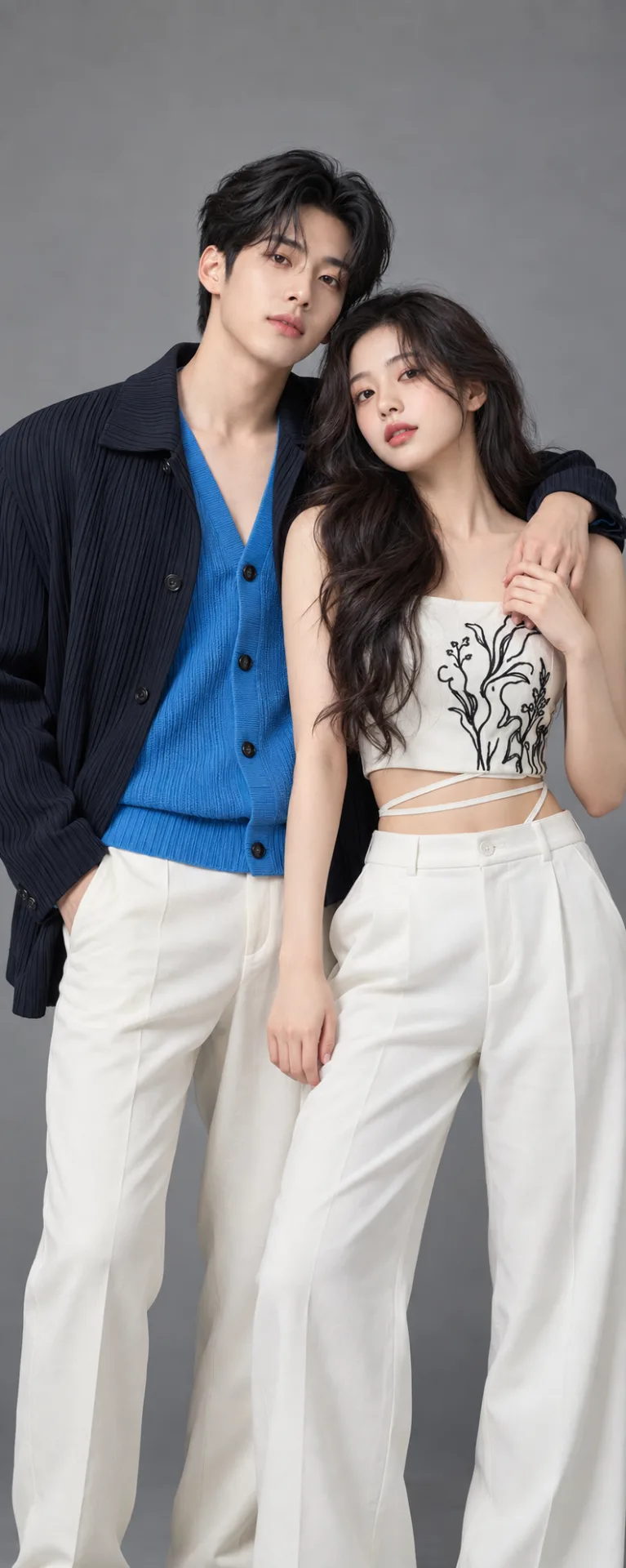
💙🤍 Korean Couple Fashion Photography – Blue & White Studio Portrait
来源: @info_x_nik
这条提示词生成的画面:💙🤍 Korean Couple Fashion Photography – Blue & White Studio Portrait。
适用模型:ChatGPT。
可以从提示词确定的画面信息:studio lighting。
可以改的一个变量:写实 look。
如何使用这条提示词
- 适用模型:ChatGPT。
- 画面主体:💙🤍 Korean Couple Fashion Photography – Blue & White Studio Portrait。
- 改一个变量:写实 look。
0 浏览 · 0 复制 · 0 收藏 · 0 讨论
0提示词
今日剩余 1 / 1 次免费复制
aspect ratio 9:16 , Keep the person exactly as shown in the reference image with 100% identical facial features, bone structure, 4K details, has perfect facial details as reference image,{
"category": "fashion_editorial",
"category_reasoning": "The image depicts styled models in a controlled studio environment with coordinated wardrobe, typical of professional promotional or editorial photography.",
"adaptable": "either",
"subject": "A young man and woman posing together, the man's arm draped over the woman's shoulder with hands resting on each other's arms and legs",
"subject_details": "Man: early 20s, dark pleated jacket, bright blue v-neck cardigan, off-white trousers. Woman: early 20s, long wavy dark hair, white crop top with black organic linear embroidery, thin waist straps, white high-waisted pants. Both have neutral soft expressions.",
"setting": "Indoor professional photography studio",
"setting_details": "Seamless neutral gray backdrop, empty of props",
"composition": "Medium shot, eye-level angle, flat depth, subjects centered, minimal negative space, intertwined posing creating a triangular visual flow",
"camera": "Medium telephoto lens, eye-level perspective, medium depth of field, sharp subject focus against flat background",
"lighting": "Soft diffused studio lighting, front-angled key, flat lighting ratio, soft shadow transitions, minimal contrast, soft catchlights",
"color_grade": "Muted-pastel with high-saturation pops, soft warm skin tones, low contrast",
"color_palette": "Blue, white, charcoal, neutral gray, warm peach",
"style": "Asian drama promotional poster, K-pop editorial, studio fashion portrait, heavily retouched digital photography",
"mood": "Calm, intimate, polished, serene",
"textures_materials": "Pleated matte fabric on the jacket, soft knit cardigan, matte white fabric, embroidered detailing, completely smooth skin",
"post_processing": "Heavy frequency separation, extreme skin smoothing, AI upscaling or painterly denoise artifacts, soft digital sharpening, flat contrast curve",
"recreation_prompt": "fashion_editorial, A young man and woman posing together, the man's arm draped over the woman's shoulder, Man in dark pleated jacket and bright blue v-neck cardigan with off-white trousers, Woman with long wavy dark hair in white crop top with black embroidery and white high-waisted pants, Medium shot, eye-level angle, flat depth, subjects centered, Soft diffused studio lighting, flat lighting ratio, Muted-pastel grade with soft warm skin tones, Asian drama promotional poster style, heavily retouched, smooth skin, medium telephoto lens, sharp subject focus, editorial fashion.",
"adaptation_prompt": "fashion_editorial, [YOUR SUBJECT OR PRODUCT] posing together, Medium shot, eye-level angle, flat depth, subjects centered, Soft diffused studio lighting, flat lighting ratio, Muted-pastel grade with soft warm skin tones, Asian drama promotional poster style, heavily retouched, smooth skin, medium telephoto lens, sharp subject focus, editorial fashion.",
"negative_prompt": "harsh shadows, high contrast, glossy skin, textured skin, cluttered background, distorted limbs, oversaturated, film grain",
"color_science": "Neutral gray background, warm skin tones with peach bias, bright saturated blue midtone, desaturated highlights, low overall contrast",
"filter_name": "Heavy beauty filter and AI enhancement",
"filter_description": "Extreme skin smoothing, frequency separation, removal of all skin texture and pores, digital painterly effect typical of AI upscaling or heavy digital retouching, lifted blacks",
"white_balance": "Neutral daylight",
"color_temperature": "Neutral, approx 5500K",
"tone_curve": "Flat, lifted blacks, compressed highlights",
"dynamic_range": "Standard dynamic range, contained within midtones and soft highlights, no pure blacks",
"highlight_rendering": "Soft, rolled off, diffused",
"shadow_rendering": "Lifted, low density, soft edges",
"camera_rendering": "Clean digital sensor, heavily processed",
"lens_rendering": "Minimal distortion, flat field, moderate telephoto compression",
"noise_profile": "Completely denoised, slightly painterly artifacts",
"grain_profile": "None",
"sharpness_profile": "Digitally sharpened edges, soft interior textures, lacking micro-contrast",
"retouching_analysis": "Extreme skin retouching, heavy frequency separation, liquefy adjustments, removal of natural skin texture, painterly AI upscaling artifacts visible",
"portrait_analysis": "Symmetrical features, perfect grooming, controlled neutral expressions, direct eye contact, relaxed muscles",
"facial_expression": "Neutral, soft, slight lip part on woman, calm gaze",
"micro_expression": "Relaxed orbicularis oculi, minimal facial tension",
"skin_rendering": "Poreless, plastic, ultra-smooth, uniform color, devoid of natural texture or blemishes",
"hair_rendering": "Soft, voluminous, digitally smoothed flyaways, uniform sheen",
"lighting_analysis": "Broad softbox key light from front and slightly above, massive fill light, no harsh shadows, extremely soft light wrap",
"visual_style_analysis": "Idol photography, commercial studio portraiture, heavily AI-enhanced aesthetic"
}
相似提示词

3D Pop-up Parents Day Card
3D 노트 위 꽃이 입체적으로 피어나는 장면, 첨부된 사진의 미니 캐릭터들이 물주고 가꾸는 모습, {argument name="날씨" default="따뜻한 5월 햇살"}, 캐리커처 스타일, 밝고 사랑스러운 분위기, 실제 꽃처럼 디테일하게,

Chibi Scrapbook Photo Transformation
remove the people around the main character, Add multiple small, cute chibi-style “mini versions” of her around the image.

AI Photo Generation Guide
1. Open Gemini / Grok / GPT Image 2.0 2. Upload your photo 3. Copy the prompt 4. Generate 5. Prompt ⤵️ https://t.co/ufvHABxbuM

Depth in Image Generation
🤯 Images 2.5 is so good at building depth!

AI Sticker-Cutout Photo Effect
How to get this viral sticker-cutout photo effect with AI GPT image 2 on chatgpt Prompt👇 https://t.co/Re6oPaU3zv

Photo made of words
Your photo, but made entirely from words 🤯👇 ① Open Gemini / Grok / GPT Image 2.0 ② Add your photo ③ Paste the prompt ④ Generate.

Photo to Hand-Drawn Art
Turn your photo into a hand-drawn masterpiece ✍️🖤 ① Upload your photo ② Copy this prompt ③ Generate ④ Done.

Rubber Stamp Travel Field Notes Poster
GPT image 2 on chatgpt Prompt👇 Please create a separate "Rubber Stamp Travel Field Notes Poster" for each photo I upload, outputting each

Event Photo Synthesis Illustration
Generate a single illustration based on the school trip photos.

Istanbul Travel Journal Collage
Image created on Gpt 2 Prompt: Ultra-realistic hand-painted watercolor travel collage with soft ink outlines, vintage travel journal

Indian Wedding Invitation Card
"एक भव्य भारतीय डिजिटल वेडिंग इनविटेशन कार्ड (Digital Wedding Invitation Card)। बैकग्राउंड में हल्के गुलाबी और सुनहरे रंग के पर्दे

Cat Ruins Photo
GPT Image 2 on ChatGPT Prompt: Use the uploaded reference image as the primary facial reference.