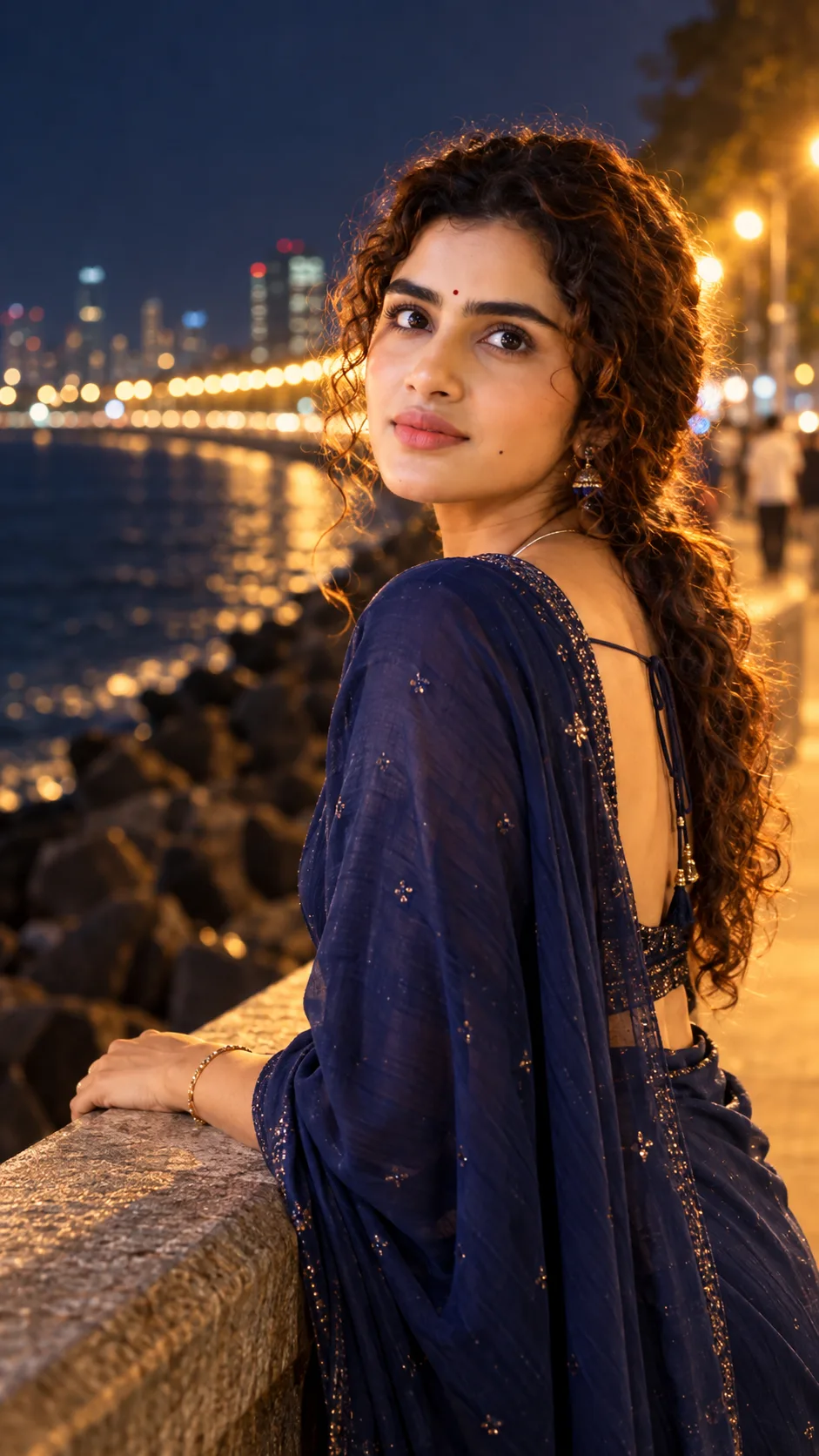
"Mumbai Marine Drive Night Editorial Portrait"
来源: @dipanshuvarma65
这条提示词生成的画面:"Mumbai Marine Drive Night Editorial Portrait"。
适用模型:ChatGPT。
可以从提示词确定的画面信息:rim light。
可以改的一个变量:写实 look。
如何使用这条提示词
- 适用模型:ChatGPT。
- 画面主体:"Mumbai Marine Drive Night Editorial Portrait"。
- 改一个变量:写实 look。
0 浏览 · 0 复制 · 0 收藏 · 0 讨论
0提示词
今日剩余 1 / 1 次免费复制
IDENTITY LOCK: Do not change the subject's facial bone structure, eye
shape and color, nose shape, lip shape, jawline, or skin tone in any
way — keep it 100% identical to the original uploaded photo. Body
build and proportions unchanged. Non-negotiable.

DO NOT COPY FROM REFERENCE: This is a full re-render, not a direct
edit of the original photo. Only carry over the facial identity (bone
structure, eyes, nose, lips, jawline, skin tone) from the reference
photo — do NOT copy the original photo's expression, eye gaze
direction, head angle/tilt, or body pose. Treat expression and pose
as completely open and generate them fresh based on the scene
described below, not based on what the reference photo shows.

LIGHTING SETUP (as a real photographer would dial it in): Key light —
warm sodium-vapor streetlights along Marine Drive's promenade, acting
as a soft golden key from camera-left at chest height. Fill — cool
ambient glow from the dark sea and night sky, softly balancing the
warm key at close to a 2:1 ratio. Rim light — distant city lights
and the curved string of promenade lamps ("Queen's Necklace") create
a soft golden edge-glow along her hair and shoulder. Catchlights in
her eyes should be warm and soft, picking up the streetlight glow.

LENS & OPTICS: Simulate an 85mm lens at f/2.0 — flattering facial
compression, background rendered as soft creamy bokeh with the curved
line of promenade lights and dark sea softly blurred, gentle fall-off
in sharpness away from the focal point, faint natural vignette at the
corners.

FILM/COLOR SCIENCE: Warm-cool night film response — streetlight
highlights bloom softly rather than clipping, shadows lifted with a
faint cool-blue tint rather than crushed black, warm amber skin
midtones held steady against the cooler night sky and sea for natural
depth separation.

Style: A breezy georgette saree or chic western outfit in a rich
jewel tone, hair loosely tied with a few strands lifted by the sea
breeze, minimal glam makeup, delicate jewelry catching the streetlight.

DIRECTED POSE (as if a photographer is instructing her in real time):
Leaning lightly against the sea-facing railing, one hand resting on
the stone ledge, body angled at three-quarters to the camera, head
turned back over one shoulder toward the lens — freshly generated for
this scene, not matching the reference photo's original pose.

GENUINE DIRECTED EXPRESSION: A soft, confident smile with gently
relaxed eyes, chin very slightly lowered — the natural composed look
right after a photographer says "just lean on the railing and glance
back at me," not a stiff posed grin, and not simply copied from the
reference photo's expression.

RETOUCH PIPELINE: Frequency-separation-style retouching — smooth
tonal transitions on skin while fully preserving fine pore-level
texture and natural color variation under the mixed warm/cool
lighting. Subtle dodge-and-burn to retain natural facial planes, no
flattened or washed-out glow.

FINISHING: Fine film grain overlay at low opacity, very slight
chromatic softness at the frame edges as a real lens would render, no
digital sharpening halos, natural imperfect crop as if not perfectly
composed in-camera.

Ensure zero facial distortion, correct hand anatomy, and consistent
shadow/light-source logic between the warm streetlight key and cool
sea-night fill.
相似提示词

3D Pop-up Parents Day Card
3D 노트 위 꽃이 입체적으로 피어나는 장면, 첨부된 사진의 미니 캐릭터들이 물주고 가꾸는 모습, {argument name="날씨" default="따뜻한 5월 햇살"}, 캐리커처 스타일, 밝고 사랑스러운 분위기, 실제 꽃처럼 디테일하게,

Chibi Scrapbook Photo Transformation
remove the people around the main character, Add multiple small, cute chibi-style “mini versions” of her around the image.

AI Photo Generation Guide
1. Open Gemini / Grok / GPT Image 2.0 2. Upload your photo 3. Copy the prompt 4. Generate 5. Prompt ⤵️ https://t.co/ufvHABxbuM

Depth in Image Generation
🤯 Images 2.5 is so good at building depth!

AI Sticker-Cutout Photo Effect
How to get this viral sticker-cutout photo effect with AI GPT image 2 on chatgpt Prompt👇 https://t.co/Re6oPaU3zv

Photo made of words
Your photo, but made entirely from words 🤯👇 ① Open Gemini / Grok / GPT Image 2.0 ② Add your photo ③ Paste the prompt ④ Generate.

Photo to Hand-Drawn Art
Turn your photo into a hand-drawn masterpiece ✍️🖤 ① Upload your photo ② Copy this prompt ③ Generate ④ Done.

Rubber Stamp Travel Field Notes Poster
GPT image 2 on chatgpt Prompt👇 Please create a separate "Rubber Stamp Travel Field Notes Poster" for each photo I upload, outputting each

Event Photo Synthesis Illustration
Generate a single illustration based on the school trip photos.

Istanbul Travel Journal Collage
Image created on Gpt 2 Prompt: Ultra-realistic hand-painted watercolor travel collage with soft ink outlines, vintage travel journal

Indian Wedding Invitation Card
"एक भव्य भारतीय डिजिटल वेडिंग इनविटेशन कार्ड (Digital Wedding Invitation Card)। बैकग्राउंड में हल्के गुलाबी और सुनहरे रंग के पर्दे

Cat Ruins Photo
GPT Image 2 on ChatGPT Prompt: Use the uploaded reference image as the primary facial reference.