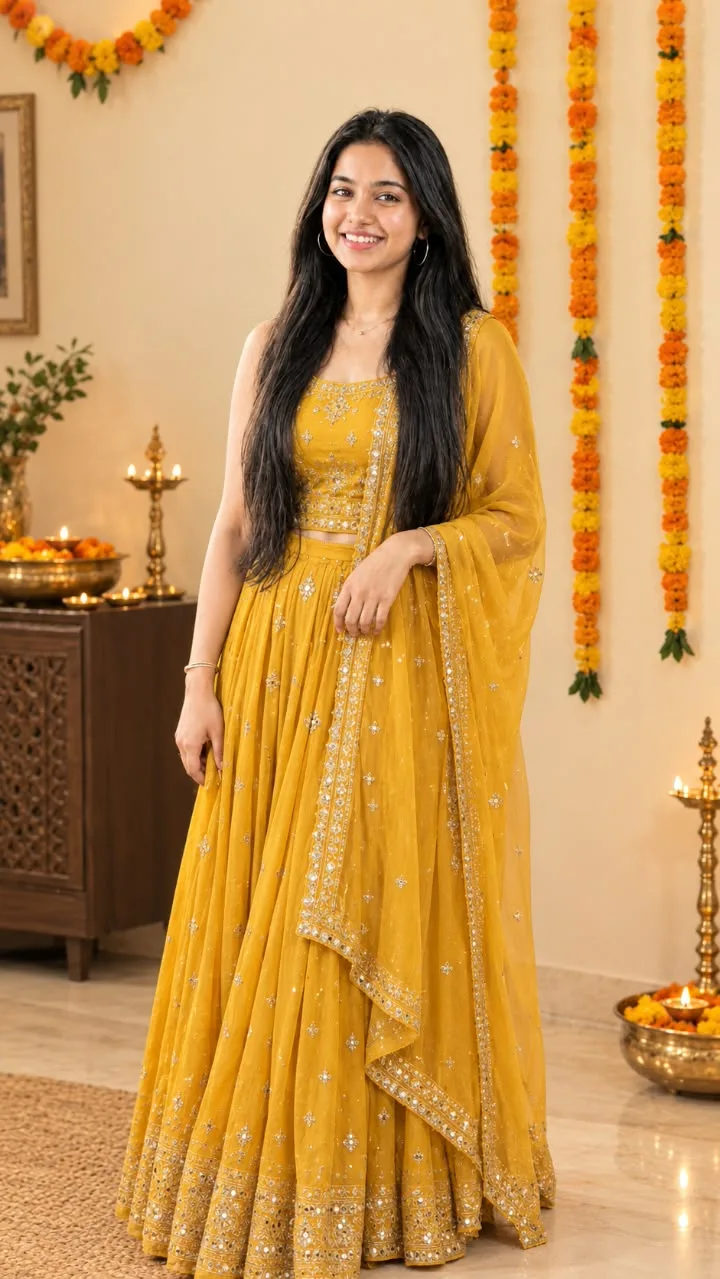
Navratri ke liye best prompt
来源: @navya
这条提示词生成的画面:Navratri ke liye best prompt。
适用模型:ChatGPT。
可以改的一个变量:写实 look。
如何使用这条提示词
- 适用模型:ChatGPT。
- 画面主体:Navratri ke liye best prompt。
- 改一个变量:写实 look。
0 浏览 · 0 复制 · 0 收藏 · 0 讨论
0提示词
今日剩余 1 / 1 次免费复制
Use the uploaded reference image as the PRIMARY and STRICT reference. Recreate the photograph as an extremely realistic, high-resolution image with maximum possible fidelity to the reference.
ABSOLUTE RULE — DO NOT CHANGE THE ORIGINAL PHOTO COMPOSITION:
Keep the exact same person, exact same face, exact same facial identity, exact same hairstyle, exact same expression, exact same body position, exact same pose, exact same hand positions, exact same clothing, exact same dupatta drape, exact same jewelry, exact same background, exact same decorations, exact same lamps, exact same furniture, exact same flowers, exact same framing, exact same camera angle, exact same perspective, exact same lighting and exact same overall composition as the reference image.
FACE & IDENTITY — HIGHEST PRIORITY
Preserve the face with maximum possible fidelity to the reference image. Keep the same facial structure, face shape, forehead, eyebrows, eyes, eye shape, eyelids, nose, lips, cheeks, chin, jawline, skin tone, natural facial proportions, hairline and facial expression. Do not beautify, reshape, slim, widen, age, de-age, retouch or modify the face. Do not change the person's identity in any way. The generated face must look like the same person from the reference, not a similar-looking person.
POSE & BODY
Reproduce the exact same standing pose and body posture from the reference. Keep the head angle, shoulder position, torso orientation, arm positions, elbow positions, hand placement, finger positioning and overall body proportions unchanged.
CLOTHING
Keep the exact same mustard-yellow/golden traditional outfit with all embroidery, silver embellishments, borders, patterns, fabric texture and details unchanged. Keep the dupatta exactly as shown, including its placement, folds, transparency and decorative border. Do not redesign, recolor, replace or simplify the clothes.
BACKGROUND
Reproduce the exact same warm beige festive interior. Keep every visible background element in the same position: marigold flower garlands, wall decoration, framed artwork, plants, wooden cabinet, brass diya stands, brass bowls, flowers, candles/lamps, floor, rug and all other objects. Do not add, remove, replace or rearrange anything.
CAMERA & COMPOSITION
Maintain the same vertical 9:16 composition, same crop, same camera height, same focal perspective, same subject size and same positioning within the frame. Preserve the original amount of visible floor, ceiling/wall space and background.
LIGHTING & QUALITY
Keep the same warm festive lighting, natural shadows, highlights, exposure, depth of field and photographic look. Create a photorealistic DSLR-quality result, natural skin texture, realistic fabric texture and sharp fine details.
NEGATIVE INSTRUCTIONS:
No face change, no identity change, no different person, no different pose, no different expression, no different hairstyle, no clothing change, no color change, no background change, no object rearrangement, no new accessories, no missing accessories, no body reshaping, no beautification, no artificial skin, no cartoon effect, no AI-looking face, no extra fingers, no distorted hands, no altered proportions, no change in framing.
Final requirement: The output should look as close as technically possible to the uploaded reference photograph, as if the original photograph itself was reproduced with the same person, same pose, same clothes, same background and same composition.
相似提示词

3D Pop-up Parents Day Card
3D 노트 위 꽃이 입체적으로 피어나는 장면, 첨부된 사진의 미니 캐릭터들이 물주고 가꾸는 모습, {argument name="날씨" default="따뜻한 5월 햇살"}, 캐리커처 스타일, 밝고 사랑스러운 분위기, 실제 꽃처럼 디테일하게,

Chibi Scrapbook Photo Transformation
remove the people around the main character, Add multiple small, cute chibi-style “mini versions” of her around the image.

AI Photo Generation Guide
1. Open Gemini / Grok / GPT Image 2.0 2. Upload your photo 3. Copy the prompt 4. Generate 5. Prompt ⤵️ https://t.co/ufvHABxbuM

Depth in Image Generation
🤯 Images 2.5 is so good at building depth!

AI Sticker-Cutout Photo Effect
How to get this viral sticker-cutout photo effect with AI GPT image 2 on chatgpt Prompt👇 https://t.co/Re6oPaU3zv

Photo made of words
Your photo, but made entirely from words 🤯👇 ① Open Gemini / Grok / GPT Image 2.0 ② Add your photo ③ Paste the prompt ④ Generate.

Photo to Hand-Drawn Art
Turn your photo into a hand-drawn masterpiece ✍️🖤 ① Upload your photo ② Copy this prompt ③ Generate ④ Done.

Rubber Stamp Travel Field Notes Poster
GPT image 2 on chatgpt Prompt👇 Please create a separate "Rubber Stamp Travel Field Notes Poster" for each photo I upload, outputting each

Event Photo Synthesis Illustration
Generate a single illustration based on the school trip photos.

Istanbul Travel Journal Collage
Image created on Gpt 2 Prompt: Ultra-realistic hand-painted watercolor travel collage with soft ink outlines, vintage travel journal

Indian Wedding Invitation Card
"एक भव्य भारतीय डिजिटल वेडिंग इनविटेशन कार्ड (Digital Wedding Invitation Card)। बैकग्राउंड में हल्के गुलाबी और सुनहरे रंग के पर्दे

Cat Ruins Photo
GPT Image 2 on ChatGPT Prompt: Use the uploaded reference image as the primary facial reference.