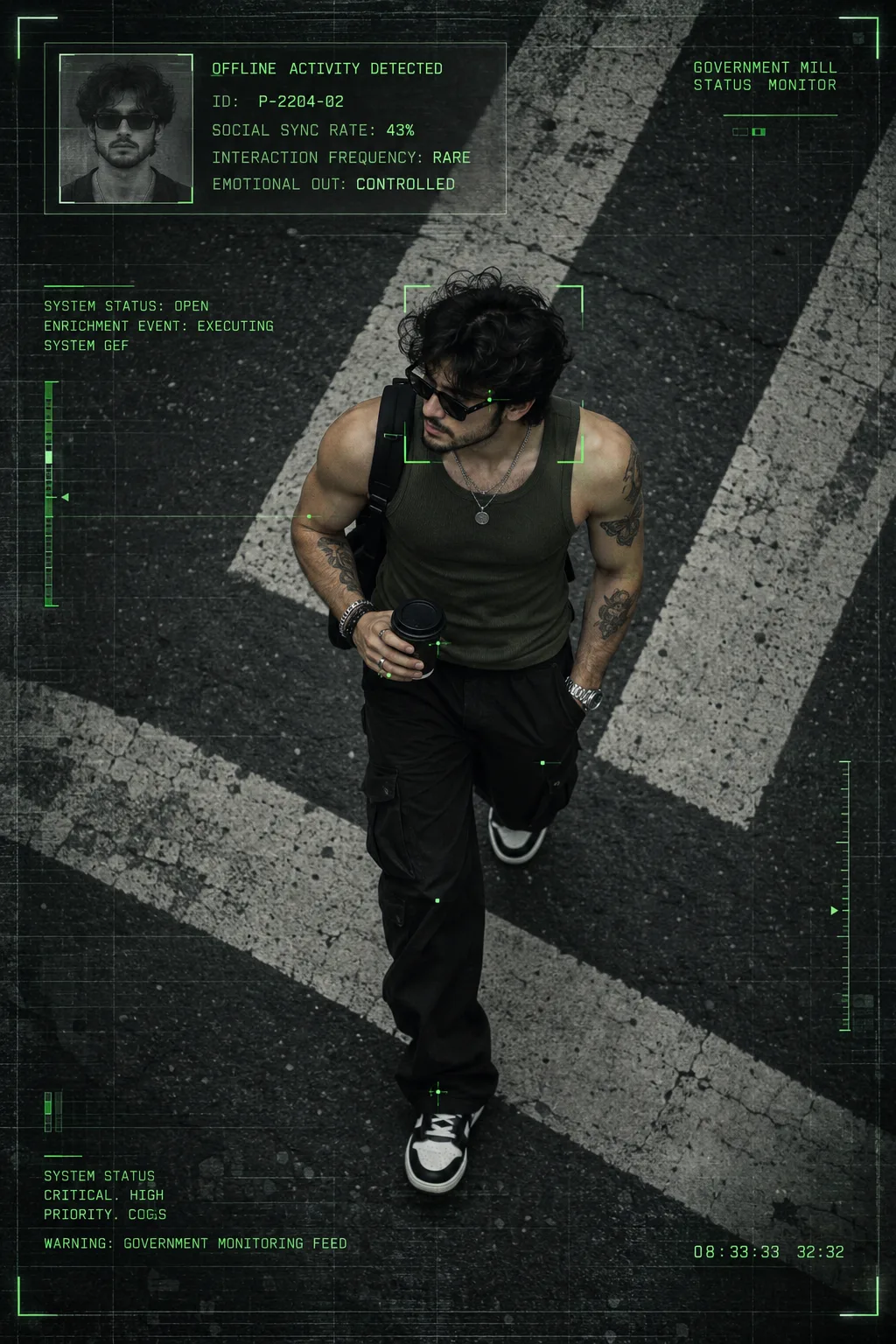
OFFLINE ACTIVITY // P-2204-02
来源: @promptzy
这条提示词生成的画面:OFFLINE ACTIVITY // P-2204-02。
适用模型:ChatGPT。
可以从提示词确定的画面信息:overhead。
可以改的一个变量:写实 look。
如何使用这条提示词
- 适用模型:ChatGPT。
- 画面主体:OFFLINE ACTIVITY // P-2204-02。
- 改一个变量:写实 look。
0 浏览 · 0 复制 · 0 收藏 · 0 讨论
0提示词
今日剩余 1 / 1 次免费复制
Create a high-resolution 2:3 portrait cinematic surveillance poster featuring an adult male naturally walking diagonally across an urban asphalt street, captured from an extreme high-angle camera directly above and slightly forward, with a full-body mid-stride composition.

He wears a dark olive-green fitted sleeveless tank top, loose black cargo pants, black-and-white casual sneakers, black sunglasses, layered necklaces, a wristwatch, multiple bracelets and rings, and carries a black takeaway coffee cup. He has dark medium-length slightly messy hair, a short mustache and beard, and visible tattoos on both arms.

The environment is a dark textured asphalt road with large diagonal white pedestrian-crossing stripes, creating strong geometric leading lines and a dramatic overhead perspective. Keep the background minimal, with plenty of road surrounding the subject.

Apply a cold cinematic surveillance color grade using charcoal black, dark gray, desaturated green, and off-white, with muted saturation, high contrast, and a subtle neon-green accent color #88FF73.

Add a sophisticated government/military surveillance HUD interface across the entire frame: a subtle fine grid, neon-green facial and body tracking points, thin corner tracking brackets around the subject's head and upper body, and minimal military-style corner markers on all four corners.

Place a transparent dark-green HUD information panel in the top-left, occupying approximately 57% of the frame width. Include a monochrome identification portrait inside a thin neon-green border and the following technical text:

“OFFLINE ACTIVITY DETECTED, ID: P-2204-02, SOCIAL SYNC RATE: 43%, INTERACTION FREQUENCY: RARE, EMOTIONAL OUT: CONTROLLED”

Add small technical surveillance text in the top-right reading:

“GOVERNMENT MILL STATUS MONITOR”

On the left-middle include:

“SYSTEM STATUS: OPEN / ENRICHMENT EVENT: EXECUTING / SYSTEM GEF”

At the bottom-left include:

“SYSTEM STATUS / CRITICAL. HIGH / PRIORITY. COGS / WARNING: GOVERNMENT MONITORING FEED”

Add a digital timestamp “08:33:33 32:32” at the bottom-right.

Use a DIN Condensed / Eurostile / OCR-inspired technical sans-serif, uppercase lettering, slightly expanded tracking, medium weight, and neon-green text.

Finish with subtle film grain, analog noise, very subtle scanlines, light vignette, moderate sharpening, minimal motion blur, subtle green interface glow, and a slightly distressed surveillance-camera texture.

Use natural overcast daylight with soft shadows, slightly underexposed exposure, controlled highlights, and high cinematic contrast.

The final image should feel like a high-end cinematic paparazzi photograph transformed into a futuristic classified government surveillance monitoring frame, combining military surveillance HUD, government monitoring interface, cinematic spy thriller, near-future dystopian technology, and photorealistic street photography.
相似提示词

3D Pop-up Parents Day Card
3D 노트 위 꽃이 입체적으로 피어나는 장면, 첨부된 사진의 미니 캐릭터들이 물주고 가꾸는 모습, {argument name="날씨" default="따뜻한 5월 햇살"}, 캐리커처 스타일, 밝고 사랑스러운 분위기, 실제 꽃처럼 디테일하게,

Chibi Scrapbook Photo Transformation
remove the people around the main character, Add multiple small, cute chibi-style “mini versions” of her around the image.

AI Photo Generation Guide
1. Open Gemini / Grok / GPT Image 2.0 2. Upload your photo 3. Copy the prompt 4. Generate 5. Prompt ⤵️ https://t.co/ufvHABxbuM

Depth in Image Generation
🤯 Images 2.5 is so good at building depth!

AI Sticker-Cutout Photo Effect
How to get this viral sticker-cutout photo effect with AI GPT image 2 on chatgpt Prompt👇 https://t.co/Re6oPaU3zv

Photo made of words
Your photo, but made entirely from words 🤯👇 ① Open Gemini / Grok / GPT Image 2.0 ② Add your photo ③ Paste the prompt ④ Generate.

Photo to Hand-Drawn Art
Turn your photo into a hand-drawn masterpiece ✍️🖤 ① Upload your photo ② Copy this prompt ③ Generate ④ Done.

Rubber Stamp Travel Field Notes Poster
GPT image 2 on chatgpt Prompt👇 Please create a separate "Rubber Stamp Travel Field Notes Poster" for each photo I upload, outputting each

Event Photo Synthesis Illustration
Generate a single illustration based on the school trip photos.

Istanbul Travel Journal Collage
Image created on Gpt 2 Prompt: Ultra-realistic hand-painted watercolor travel collage with soft ink outlines, vintage travel journal

Indian Wedding Invitation Card
"एक भव्य भारतीय डिजिटल वेडिंग इनविटेशन कार्ड (Digital Wedding Invitation Card)। बैकग्राउंड में हल्के गुलाबी और सुनहरे रंग के पर्दे

Cat Ruins Photo
GPT Image 2 on ChatGPT Prompt: Use the uploaded reference image as the primary facial reference.