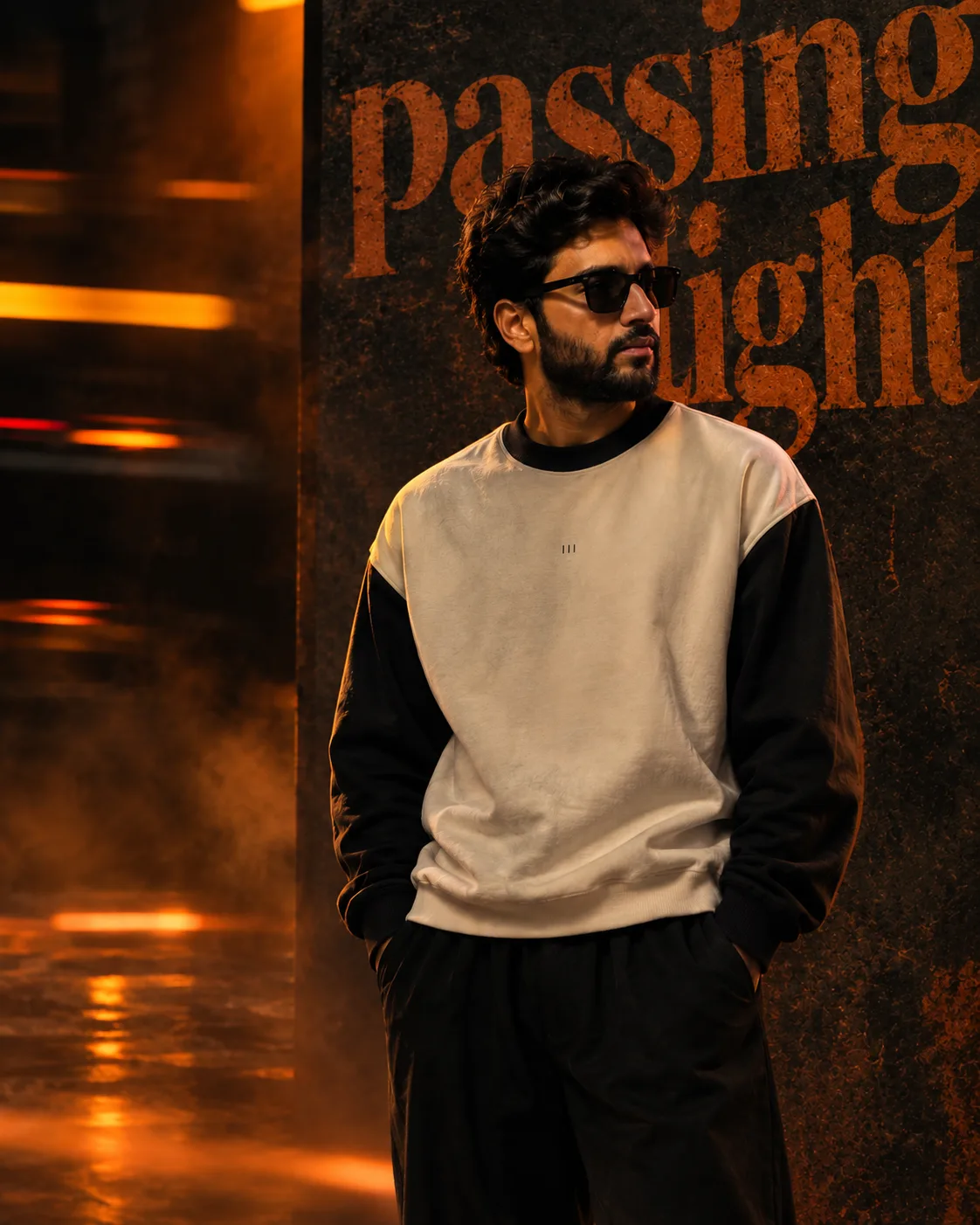
Passing Light — Cinematic Editorial
来源: @rehman
这条提示词生成的画面:Passing Light — Cinematic Editorial。
适用模型:ChatGPT。
可以从提示词确定的画面信息:three-quarter。
可以改的一个变量:写实 look。
如何使用这条提示词
- 适用模型:ChatGPT。
- 画面主体:Passing Light — Cinematic Editorial。
- 改一个变量:写实 look。
0 浏览 · 0 复制 · 0 收藏 · 0 讨论
0提示词
今日剩余 1 / 1 次免费复制
Use the uploaded user photo as the **ONLY source of the main subject’s identity**. Preserve the user’s exact recognizable identity with maximum fidelity: facial structure, face shape, facial proportions, forehead, hairline, eyebrows, natural eye shape and spacing, nose, lips, cheeks, cheekbones, jawline, chin, skin tone, natural skin texture, and all distinctive facial characteristics. **Do not copy or reproduce the reference subject’s identity. Do not beautify, reshape, slim, age, de-age, masculinize, feminize, or reinterpret the user’s face.** The user photo determines ONLY who the person is; the reference image determines how that person appears and behaves in the scene.
Recreate the reference image as closely as possible: a dark, cinematic, high-end editorial fashion poster in a vertical **4:5 composition**. Show the user's identity as a slim young adult standing approximately center-right, framed from the upper legs to above the head. The body faces mostly toward the camera/front while the head is rotated toward the **right side of the image**, creating a strong side-profile/three-quarter profile impression. The subject looks distinctly toward the right, away from the camera, with a calm, serious, contemplative expression. Keep the eyes naturally directed toward the right and maintain the same head rotation, neutral lips, relaxed facial muscles, and thoughtful mood from the reference. Do not use the facial expression, gaze, or head angle from the user's source photo.
Reproduce the exact relaxed posture: shoulders naturally lowered, torso upright, both arms hanging comfortably with both hands placed inside the trouser pockets. Keep the body proportions natural and consistent with the user's identity. Dress the subject in a minimal oversized cream/off-white sweatshirt with contrasting black/dark sleeves, dark ribbed crew neckline and dark cuffs, paired with loose black trousers. Preserve the understated fashion styling and small subtle lettering/detail on the center chest area if appropriate, without introducing prominent logos or additional graphics.
The environment is a dramatic dark industrial/editorial backdrop. Behind the subject is a large charcoal-gray vertical panel occupying much of the right and central background, covered by enormous distressed **orange-brown typography** extending beyond the frame. The background typography is purely part of the environmental design and must remain visible behind and around the subject. Use oversized cropped serif-style letters with a weathered, textured surface, creating a bold luxury magazine/poster aesthetic. Do not add any foreground caption, title, paragraph, promotional copy, or text block in the lower-left area.
The left side of the image contains dark black and charcoal shadows mixed with strong **warm orange motion-blurred light streaks**, glowing horizontal reflections, hazy amber illumination, and subtle smoky atmospheric movement. Preserve the layered motion-blur effect and orange glow, especially along the left edge and lower foreground. The background should feel deep, moody, cinematic, slightly gritty, and atmospheric rather than clean or flat.
Lighting is dramatic and directional: warm amber/orange light falls across portions of the subject's face, neck, sweatshirt, and surrounding environment, while the opposite areas remain deeply shadowed. Create strong cinematic contrast, realistic skin texture, subtle rim lighting, soft highlights, deep blacks, and controlled orange reflections. The face must remain clearly recognizable as the user's identity despite the dramatic lighting.
Camera perspective should resemble a professional fashion-editorial photograph, approximately eye-level with a very subtle low-angle intensity. Use a moderate portrait lens perspective around **50–70mm**, natural proportions, controlled perspective distortion, and moderate depth of field. Keep the subject sharply detailed while allowing the distant background and motion-blurred orange elements to retain atmospheric softness. Preserve the exact subject placement, scale, negative space, cropping, and visual balance of the reference.
Overall aesthetic: photorealistic, premium fashion editorial, cinematic poster photography, dark luxury magazine aesthetic, sophisticated orange-and-charcoal color grading, realistic fabric texture, natural skin pores, subtle film grain, crisp facial detail, high dynamic range, dramatic shadows, atmospheric haze, professional studio/composite photography, ultra-detailed, high resolution.
**STRICT NEGATIVE INSTRUCTIONS:** Do not change the user’s identity. Do not copy the reference person’s facial identity. Do not use the user photo’s original expression, gaze, or head pose. Do not add smiling or exaggerated emotion. Do not alter body proportions unnecessarily. Do not remove or redesign the large orange background typography. Do not introduce new objects, people, logos, captions, watermarks, borders, or decorative elements. Keep the composition, clothing, pose, lighting, background, color palette, and cinematic atmosphere faithful to the reference.
相似提示词

3D Pop-up Parents Day Card
3D 노트 위 꽃이 입체적으로 피어나는 장면, 첨부된 사진의 미니 캐릭터들이 물주고 가꾸는 모습, {argument name="날씨" default="따뜻한 5월 햇살"}, 캐리커처 스타일, 밝고 사랑스러운 분위기, 실제 꽃처럼 디테일하게,

Chibi Scrapbook Photo Transformation
remove the people around the main character, Add multiple small, cute chibi-style “mini versions” of her around the image.

AI Photo Generation Guide
1. Open Gemini / Grok / GPT Image 2.0 2. Upload your photo 3. Copy the prompt 4. Generate 5. Prompt ⤵️ https://t.co/ufvHABxbuM

Depth in Image Generation
🤯 Images 2.5 is so good at building depth!

AI Sticker-Cutout Photo Effect
How to get this viral sticker-cutout photo effect with AI GPT image 2 on chatgpt Prompt👇 https://t.co/Re6oPaU3zv

Photo made of words
Your photo, but made entirely from words 🤯👇 ① Open Gemini / Grok / GPT Image 2.0 ② Add your photo ③ Paste the prompt ④ Generate.

Photo to Hand-Drawn Art
Turn your photo into a hand-drawn masterpiece ✍️🖤 ① Upload your photo ② Copy this prompt ③ Generate ④ Done.

Rubber Stamp Travel Field Notes Poster
GPT image 2 on chatgpt Prompt👇 Please create a separate "Rubber Stamp Travel Field Notes Poster" for each photo I upload, outputting each

Event Photo Synthesis Illustration
Generate a single illustration based on the school trip photos.

Istanbul Travel Journal Collage
Image created on Gpt 2 Prompt: Ultra-realistic hand-painted watercolor travel collage with soft ink outlines, vintage travel journal

Indian Wedding Invitation Card
"एक भव्य भारतीय डिजिटल वेडिंग इनविटेशन कार्ड (Digital Wedding Invitation Card)। बैकग्राउंड में हल्के गुलाबी और सुनहरे रंग के पर्दे

Cat Ruins Photo
GPT Image 2 on ChatGPT Prompt: Use the uploaded reference image as the primary facial reference.