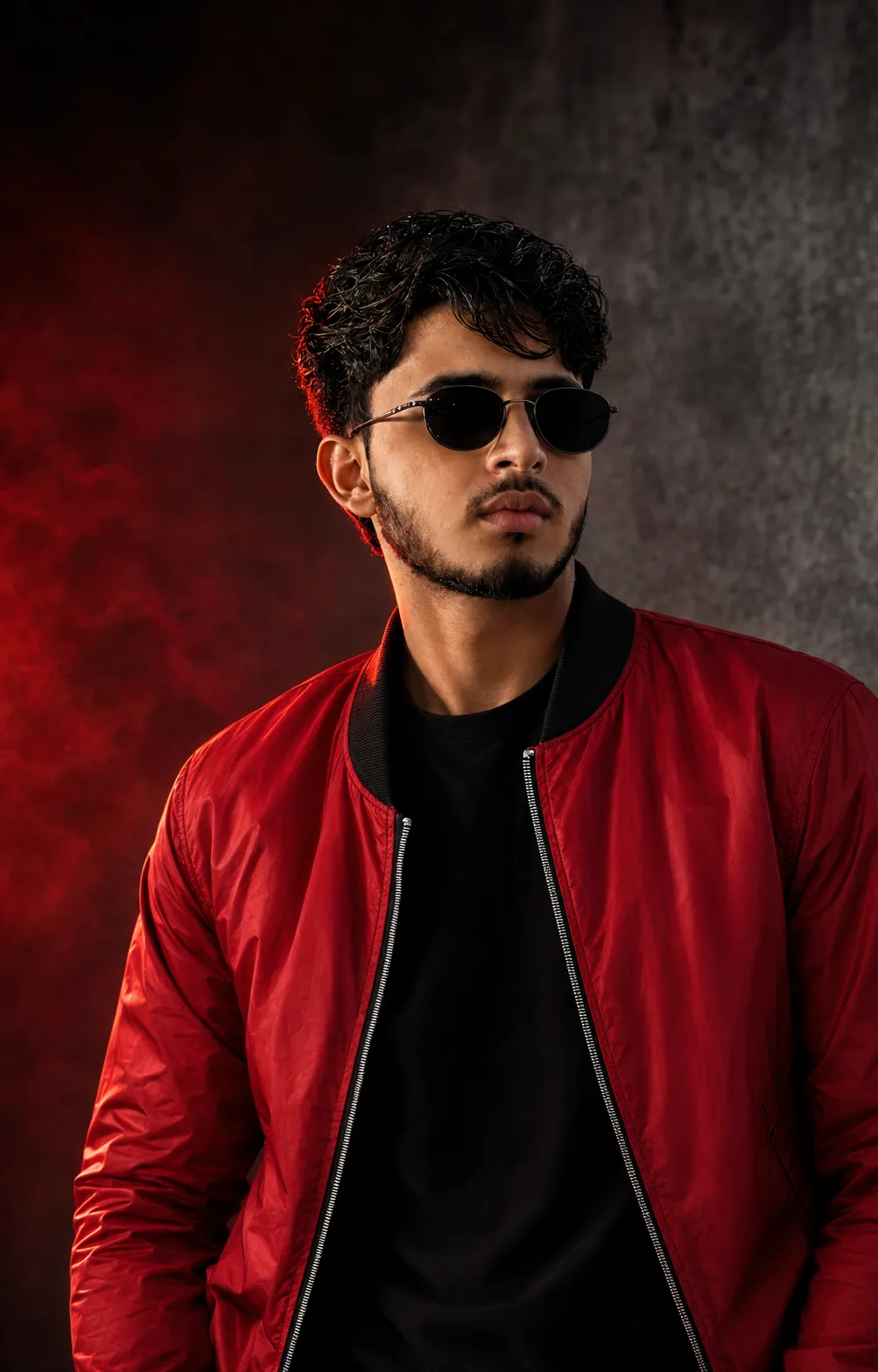
Red Rebel – Black Shades Cinematic Portrait
来源: @ai_prompt_novaa
这条提示词生成的画面:Red Rebel – Black Shades Cinematic Portrait。
适用模型:ChatGPT。
可以从提示词确定的画面信息:studio lighting。
可以改的一个变量:写实 look。
如何使用这条提示词
- 适用模型:ChatGPT。
- 画面主体:Red Rebel – Black Shades Cinematic Portrait。
- 改一个变量:写实 look。
0 浏览 · 0 复制 · 0 收藏 · 0 讨论
0提示词
今日剩余 1 / 1 次免费复制
IDENTITY REFERENCE — ABSOLUTE HIGHEST PRIORITY:

Use the newly uploaded photograph as the ONLY source for the person’s identity. Ignore the uploaded photograph’s original clothes, sunglasses, hairstyle styling, pose, expression, lighting, camera angle and background.

Preserve the uploaded person’s exact recognizable identity and natural facial anatomy: apparent age, natural skin tone, face shape, forehead, natural hairline, eyebrow shape and spacing, eye position, nose bridge, nose length and tip, cheeks, cheekbones, lips, ears, jaw width, jaw angle, chin, moustache, beard outline, beard density and every natural facial proportion.

The finished portrait must remain immediately recognizable as the uploaded individual. Do not blend his identity with another model, generate a generic replacement face, beautify excessively, change his skin tone, enlarge the eyes, sharpen the jaw, modify the nose, alter the lips, change the beard pattern or make him appear older or younger.

PORTRAIT STYLE AND COMPOSITION:

Create a premium cinematic men’s fashion portrait showing the person from approximately the lower chest upward. Position him slightly toward the right side of the frame. His upper body should lean gently toward the camera while his head is tilted slightly to one side.

Give him a calm, confident and serious expression. His lips should remain naturally relaxed and closed. His face should be directed toward the camera with a strong editorial-model presence.

Use a slightly low and gently tilted camera angle. Keep the entire head, hairstyle, shoulders and most of the red jacket visible. Do not crop the top of the hair, chin or shoulders.

HAIRSTYLE:

Give him thick, voluminous, naturally messy black-brown hair. Keep the hairstyle medium-short with realistic waves, textured volume on top and separate loose strands falling naturally across the forehead.

Preserve his natural hairline. The hair must look dry, soft and naturally styled. Do not create long hair, straight silky hair, an artificial wig, excessive wet shine, sharp spikes or an unrealistic hairstyle.

CLOTHING:

Dress him in a premium bright-red bomber jacket with realistic slightly glossy nylon fabric, a thick black ribbed collar, black inner lining and a clearly visible metallic silver front zipper.

Keep the jacket open at the front. Underneath it, give him a completely plain deep-black round-neck T-shirt. The T-shirt must have no logo, writing, illustration, print, pattern or decorative stitching.

The jacket should show realistic folds, stitching, fabric texture, highlights and natural shadows. Do not make the jacket oversized or change it into a leather jacket, blazer, hoodie or shirt.

SUNGLASSES:

Give him small oval-shaped black sunglasses with a thin dark metallic frame. Use deep glossy black lenses with only subtle studio-light reflections. The lenses must remain predominantly black and must not turn blue, brown, transparent or mirror-coloured.

Fit the sunglasses naturally and symmetrically to his exact face. The bridge must rest correctly on his nose, and both arms must align naturally with his ears. Do not enlarge the sunglasses or cover an excessive portion of the face.

BACKGROUND:

Replace the original background completely with a premium dark cinematic studio environment.

Use a charcoal-grey concrete-textured background on the right side and a deep black-to-red smoky gradient on the left side. Add a diffused red glow behind the person’s hair and left shoulder. Include soft atmospheric red smoke without creating heavy clouds or distracting shapes.

Keep the background clean, luxurious and uncluttered. No city, balcony, buildings, furniture, text, logo or visible objects.

LIGHTING:

Use professional cinematic studio lighting:

- A soft warm key light illuminating the face from the front-right.
- A controlled deep-red rim light illuminating the hair, ear, shoulder and jacket from the back-left.
- Gentle shadow modelling around the cheeks, jaw and neck.
- Realistic catchlight reflections on the sunglasses.
- Natural highlights on the jacket’s folds and metallic zipper.

Keep the person clearly separated from the dark background. The face must remain properly exposed, sharp and detailed—never excessively dark.

IMAGE QUALITY:

Ultra-realistic professional DSLR fashion photography, natural skin pores, realistic facial hair, detailed individual hair strands, sharp facial features, realistic fabric texture, accurate anatomy, cinematic contrast, shallow depth of field, premium editorial colour grading, ultra-HD, photorealistic, crisp 8K-quality appearance.

FORMAT:

Vertical 4:5 portrait composition, ideally 2048 × 2560 pixels. Lower-chest-up framing with the person filling most of the frame while maintaining balanced negative space around the head and shoulders.

STRICT NEGATIVE CONSTRAINTS:

Do not change the person’s identity, facial proportions, natural skin colour, hairline, nose, lips, jaw, moustache or beard pattern.

Do not add a wristwatch, necklace, earrings, rings, tattoos, cap, hat, headphones or additional accessories.

No white T-shirt, blue sunglasses, transparent lenses, leather jacket, city background, balcony, buildings, text, logo, watermark, signature or additional people.

Avoid facial distortion, asymmetrical sunglasses, mismatched eyes, deformed ears, double facial features, plastic skin, excessive skin smoothing, unrealistic beard, blurry face, low resolution, cartoon style, painting style, CGI appearance or artificial anatomy.
相似提示词

3D Pop-up Parents Day Card
3D 노트 위 꽃이 입체적으로 피어나는 장면, 첨부된 사진의 미니 캐릭터들이 물주고 가꾸는 모습, {argument name="날씨" default="따뜻한 5월 햇살"}, 캐리커처 스타일, 밝고 사랑스러운 분위기, 실제 꽃처럼 디테일하게,

Chibi Scrapbook Photo Transformation
remove the people around the main character, Add multiple small, cute chibi-style “mini versions” of her around the image.

AI Photo Generation Guide
1. Open Gemini / Grok / GPT Image 2.0 2. Upload your photo 3. Copy the prompt 4. Generate 5. Prompt ⤵️ https://t.co/ufvHABxbuM

Depth in Image Generation
🤯 Images 2.5 is so good at building depth!

AI Sticker-Cutout Photo Effect
How to get this viral sticker-cutout photo effect with AI GPT image 2 on chatgpt Prompt👇 https://t.co/Re6oPaU3zv

Photo made of words
Your photo, but made entirely from words 🤯👇 ① Open Gemini / Grok / GPT Image 2.0 ② Add your photo ③ Paste the prompt ④ Generate.

Photo to Hand-Drawn Art
Turn your photo into a hand-drawn masterpiece ✍️🖤 ① Upload your photo ② Copy this prompt ③ Generate ④ Done.

Rubber Stamp Travel Field Notes Poster
GPT image 2 on chatgpt Prompt👇 Please create a separate "Rubber Stamp Travel Field Notes Poster" for each photo I upload, outputting each

Event Photo Synthesis Illustration
Generate a single illustration based on the school trip photos.

Istanbul Travel Journal Collage
Image created on Gpt 2 Prompt: Ultra-realistic hand-painted watercolor travel collage with soft ink outlines, vintage travel journal

Indian Wedding Invitation Card
"एक भव्य भारतीय डिजिटल वेडिंग इनविटेशन कार्ड (Digital Wedding Invitation Card)। बैकग्राउंड में हल्के गुलाबी और सुनहरे रंग के पर्दे

Cat Ruins Photo
GPT Image 2 on ChatGPT Prompt: Use the uploaded reference image as the primary facial reference.