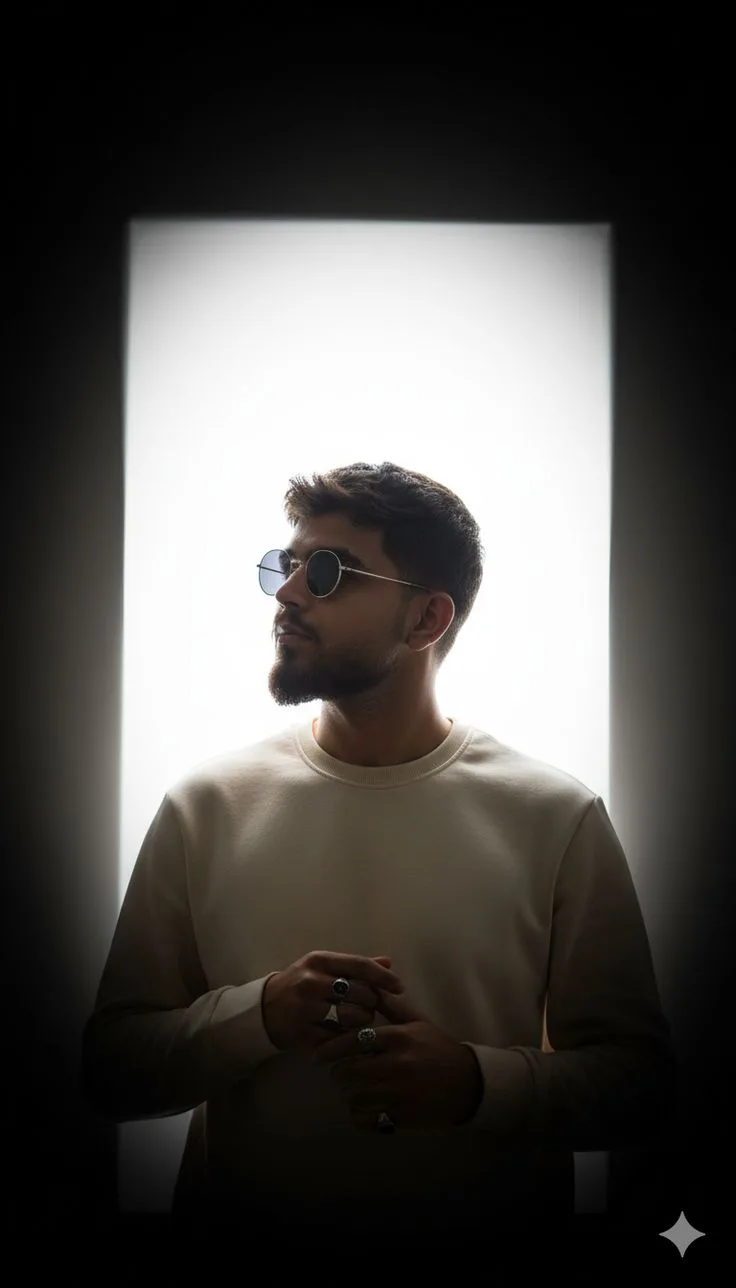
Silence Looks Better in the Dark
来源: @sarvapratham
这条提示词生成的画面:Silence Looks Better in the Dark。
适用模型:ChatGPT。
可以从提示词确定的画面信息:backlight。
可以改的一个变量:写实 look。
如何使用这条提示词
- 适用模型:ChatGPT。
- 画面主体:Silence Looks Better in the Dark。
- 改一个变量:写实 look。
0 浏览 · 0 复制 · 0 收藏 · 0 讨论
0提示词
今日剩余 1 / 1 次免费复制
STYLE TRANSFER / EDITING PROMPT:

Create an ultra-realistic 8K UHD vertical 4:5 cinematic luxury fashion editorial portrait.

IMPORTANT:
Use the PROVIDED SUBJECT/IMAGE as the sole and primary identity reference. Preserve that person's exact recognizable identity, facial structure, facial proportions, natural skin tone, hairstyle, age, and distinctive characteristics. Do NOT replace the person with the subject from any style reference. Do NOT copy the identity, facial features, hairstyle, body characteristics, or personal appearance of another reference image.

Apply ONLY the visual language, photographic treatment, lighting, composition, atmosphere, color grading and editorial styling described below.


---

COMPOSITION

Create a vertically framed 4:5 premium fashion-editorial portrait.

Place the subject approximately in the center of the frame with a clean, balanced, architectural composition.

The subject should be positioned directly in front of a large vertically oriented rectangular luminous opening or diffused white light panel.

The luminous rectangle should function as a geometric frame behind the subject.

Maintain substantial dark negative space surrounding the illuminated rectangle, especially toward the upper and outer edges.

Keep the composition minimalist and highly controlled.

The subject should occupy the central portion of the frame while the lower part of the body gradually fades into darkness.

Avoid busy environmental elements, props, furniture, scenery or decorative objects.


---

LIGHTING

Use dramatic cinematic chiaroscuro lighting.

Place one enormous soft, diffused, vertically oriented white light source directly behind the subject.

The central rectangular light source should be extremely bright, soft and nearly white.

Create a gradual exposure transition:

pure/soft white center
→ pale gray
→ medium charcoal
→ deep black outer environment.

The surrounding studio environment should be extremely dark.

Strong backlighting should create subtle rim illumination around the subject's hair, shoulders and outer silhouette.

The face and front of the body should remain comparatively underexposed relative to the luminous background, while still retaining realistic facial and clothing detail.

Do NOT use flat frontal studio lighting.

Do NOT evenly illuminate the entire subject.

Allow the lower torso, arms and lower clothing to progressively merge into deep shadow.

Maintain realistic shadow information rather than turning the entire subject into a completely black silhouette.

The lighting should feel physically plausible, soft, cinematic and photographic.


---

EXPOSURE

Use intentional high dynamic range between the luminous background and the darker subject.

Bright background with controlled highlight roll-off.

Deep rich blacks around the edges.

Slightly underexposed subject.

Preserve subtle detail within the shadows.

Create a smooth vertical exposure falloff toward the lower portion of the frame.

The brightest area must remain the rectangular background rather than the subject.


---

BACKGROUND

Use an extremely minimalist black studio environment.

No furniture.

No architecture other than the luminous rectangular opening.

No plants.

No scenery.

No decorations.

No visible objects.

No text.

No logos.

No distracting elements.

The background should appear almost completely black outside the rectangular illuminated area.

The edges of the luminous rectangle should have a subtle soft diffusion rather than an unnaturally hard digital edge.


---

COLOR GRADING

Use a restrained luxury editorial color palette.

Dominant colors:

deep black,
charcoal,
soft white,
warm ivory,
muted beige,
natural skin tones.

Extremely low overall saturation.

Use slightly warm neutral midtones.

Keep whites sophisticated and slightly softened rather than harsh digital white.

Preserve natural skin color without excessive warmth or orange tones.

Create a subtle cinematic monochromatic appearance without making the image completely black-and-white.


---

CONTRAST

High cinematic contrast.

Deep blacks.

Controlled highlights.

Soft midtone transitions.

Strong separation between the luminous background and the darker subject.

Avoid crushed facial detail.

Avoid excessive HDR.

Avoid harsh digital contrast.

The tonal structure should resemble premium contemporary fashion photography.


---

TEXTURE

Maintain extremely realistic photographic texture.

Preserve natural skin pores and subtle skin variation.

Preserve realistic hair strands.

Preserve realistic clothing fibers and fabric folds.

Maintain physically believable material response.

Use very subtle fine photographic grain.

Add extremely subtle optical softness around the brightest light source.

Keep the subject's important facial details crisp while allowing the background highlights to remain slightly diffused.


---

LENS & CAMERA CHARACTER

Professional full-frame fashion photography.

Natural portrait perspective.

Approximately 50–85mm full-frame equivalent lens aesthetic.

Moderate depth of field.

Precise focus on the subject's face.

Natural perspective with minimal distortion.

High-resolution optical rendering.

Subtle cinematic lens softness without losing facial detail.

No artificial digital bokeh.

No exaggerated lens effects.


---

VIGNETTE & FINISH

Apply a subtle cinematic vignette.

Darken the outer corners naturally.

Keep the luminous rectangular center dominant.

Allow the lower edge of the frame to become progressively darker.

Add extremely subtle filmic grain.

Use gentle highlight diffusion.

Use soft film-like tonal compression.

Maintain realistic dynamic range.

The final image should feel photographed rather than digitally rendered.


---

EDITORIAL AESTHETIC

Minimalist luxury fashion editorial.

Contemporary cinematic portraiture.

Quiet luxury.

Dark sophisticated atmosphere.

Architectural minimalism.

Chiaroscuro studio photography.

Understated, mysterious and premium.

The visual treatment should resemble an international luxury fashion campaign photographed in a controlled studio.


---

IDENTITY PRESERVATION

The provided subject must remain the exact person from the supplied identity reference.

Do not borrow identity characteristics from any other image.

Do not alter facial proportions.

Do not reshape the jaw, nose, eyes or lips.

Do not change skin tone.

Do not artificially beautify the face.

Do not change the person's age.

Do not change their recognizable hairstyle unless specifically requested separately.

The style transformation must affect lighting, environment, composition, exposure, color grading, texture and photographic treatment — NOT the person's identity.


---

FINAL QUALITY

Ultra-photorealistic.

8K UHD quality.

Premium professional photography.

Extremely realistic skin and material rendering.

Natural facial detail.

Physically plausible lighting.

Cinematic dynamic range.

High-resolution editorial finish.

Subtle realistic film grain.

No CGI appearance.

No illustration.

No artificial skin.

No excessive sharpening.

No excessive HDR.

No oversaturation.

No plastic texture.

No fake glow.

No cartoon appearance.

No busy background.

No unnecessary props.

FINAL RESULT:
A sophisticated, ultra-realistic 4:5 luxury fashion portrait where the PROVIDED PERSON remains completely recognizable, while the entire image receives the same dramatic visual treatment of the reference: a luminous rectangular white backlight surrounded by deep black negative space, strong chiaroscuro, subtle warm-neutral grading, controlled underexposure, soft atmospheric diffusion, deep cinematic shadows and premium minimalist editorial photography.
相似提示词

3D Pop-up Parents Day Card
3D 노트 위 꽃이 입체적으로 피어나는 장면, 첨부된 사진의 미니 캐릭터들이 물주고 가꾸는 모습, {argument name="날씨" default="따뜻한 5월 햇살"}, 캐리커처 스타일, 밝고 사랑스러운 분위기, 실제 꽃처럼 디테일하게,

Chibi Scrapbook Photo Transformation
remove the people around the main character, Add multiple small, cute chibi-style “mini versions” of her around the image.

AI Photo Generation Guide
1. Open Gemini / Grok / GPT Image 2.0 2. Upload your photo 3. Copy the prompt 4. Generate 5. Prompt ⤵️ https://t.co/ufvHABxbuM

Depth in Image Generation
🤯 Images 2.5 is so good at building depth!

AI Sticker-Cutout Photo Effect
How to get this viral sticker-cutout photo effect with AI GPT image 2 on chatgpt Prompt👇 https://t.co/Re6oPaU3zv

Photo made of words
Your photo, but made entirely from words 🤯👇 ① Open Gemini / Grok / GPT Image 2.0 ② Add your photo ③ Paste the prompt ④ Generate.

Photo to Hand-Drawn Art
Turn your photo into a hand-drawn masterpiece ✍️🖤 ① Upload your photo ② Copy this prompt ③ Generate ④ Done.

Rubber Stamp Travel Field Notes Poster
GPT image 2 on chatgpt Prompt👇 Please create a separate "Rubber Stamp Travel Field Notes Poster" for each photo I upload, outputting each

Event Photo Synthesis Illustration
Generate a single illustration based on the school trip photos.

Istanbul Travel Journal Collage
Image created on Gpt 2 Prompt: Ultra-realistic hand-painted watercolor travel collage with soft ink outlines, vintage travel journal

Indian Wedding Invitation Card
"एक भव्य भारतीय डिजिटल वेडिंग इनविटेशन कार्ड (Digital Wedding Invitation Card)। बैकग्राउंड में हल्के गुलाबी और सुनहरे रंग के पर्दे

Cat Ruins Photo
GPT Image 2 on ChatGPT Prompt: Use the uploaded reference image as the primary facial reference.