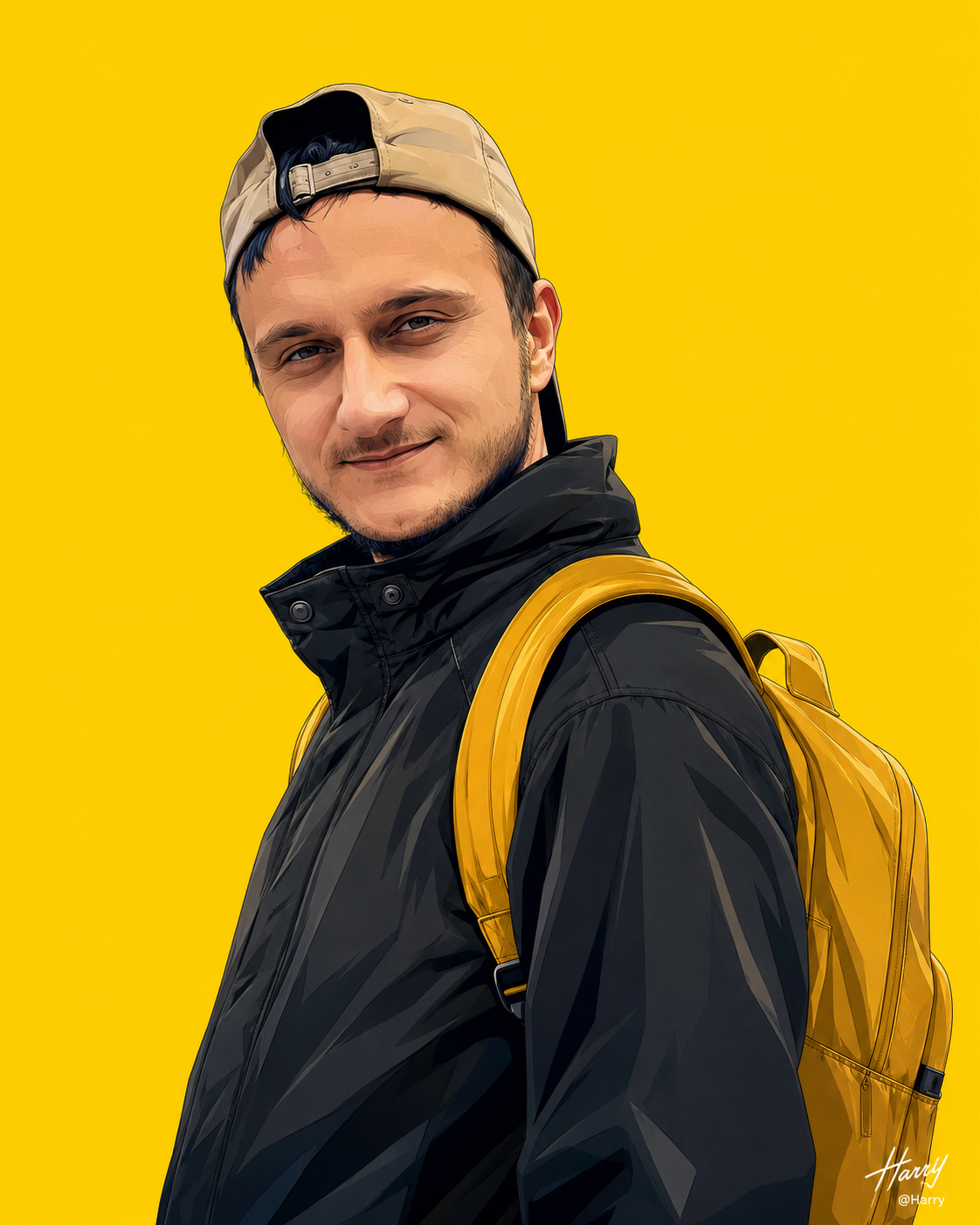
Vector illustration photography
来源: @harry
这条提示词生成的画面:Vector illustration photography。
适用模型:ChatGPT。
可以从提示词确定的画面信息:three-quarter。
可以改的一个变量:写实 look。
如何使用这条提示词
- 适用模型:ChatGPT。
- 画面主体:Vector illustration photography。
- 改一个变量:写实 look。
0 浏览 · 0 复制 · 0 收藏 · 0 讨论
0提示词
今日剩余 1 / 1 次免费复制
Create a highly detailed, clean vector illustration using the uploaded image as the exact facial reference. Preserve the uploaded man's face with complete identity accuracy. Do NOT alter, reinterpret, beautify, or regenerate his facial identity. Maintain the exact facial structure, jawline, cheekbones, forehead, nose shape, lips, eyes, eyebrows, ears, skin tone, facial proportions, expression, hairstyle, hairline, facial hair (if present), age, ethnicity, and every unique facial characteristic exactly as they appear in the uploaded image. The face must be instantly recognizable as the same person.

Create the illustration in a premium modern branded streetwear style inspired by high-end anime vector aesthetics with crisp linework, ultra-sharp edges, smooth gradient shading, bold color separation, clean geometric forms, and commercial-quality graphic design.

Show him from a low-angle three-quarter portrait, upper body only, with his head turned slightly over his shoulder toward the viewer while preserving the exact pose and facial identity from the uploaded reference.

His expression should remain identical to the uploaded photo. If the uploaded image has a subtle smile, confident look, relaxed face, or serious expression, preserve it exactly without exaggeration. Keep the eyes, eyebrows, eyelids, lips, and facial muscles identical to the original.

Maintain his original hairstyle exactly as shown in the uploaded image, including hair length, volume, texture, direction, hairline, sideburns, and any facial hair. If loose strands or natural movement fit the composition, preserve them while keeping the hairstyle recognizable. Add subtle glossy blue-black highlights while maintaining the original hair color and texture.

He wears matte black circular ear gauges (only if the uploaded image already contains ear gauges; otherwise do not add them).

Dress him in a premium oversized black high-collar windbreaker jacket featuring realistic stitched seams, structured folds, snap buttons, smooth nylon fabric, subtle reflective highlights, premium outdoor styling, and contemporary Kerala-inspired urban streetwear aesthetics.

He carries a bright golden-yellow premium backpack with padded shoulder straps over both shoulders. The backpack should harmonize with the background while remaining visually distinct through lighting, contrast, and gradient shading.

The background is a completely flat vibrant golden-yellow (#FFD400) with absolutely no texture, gradients, patterns, shadows, or objects, creating a bold minimalist branding composition.

Use strong color harmony with:
- Deep matte black clothing
- Rich golden-yellow backpack accents
- Natural skin tones matching the uploaded face exactly
- Clean neutral shadows
- Crisp vector lighting

Apply high-contrast vector lighting from the upper left, producing sharp highlights across the face, hair, jacket, and backpack while maintaining smooth gradient transitions and premium branding aesthetics.

Skin should exactly match the uploaded person's complexion with realistic warm undertones and subtle natural blush where appropriate. Do not lighten or darken the skin.

The overall artwork should feature:
- Ultra-clean vector illustration
- Premium commercial branding aesthetic
- High-end anime-inspired vector rendering
- Sharp silhouette
- Perfect proportions
- Balanced negative space
- Crisp outlines
- Smooth gradient shading
- Ultra-high resolution
- Professional editorial-quality graphic design
- Flawless composition

The uploaded face must remain the primary identity reference throughout the entire illustration. Clothing, pose, lighting, and artistic style may change, but the person's facial identity must remain unchanged and instantly recognizable.

In the absolute bottom-right corner of the image, add a delicate, minimal watermark:
First line: "Harry" in an elegant flowing signature style.
Second line: "@Harry" in a clean, understated sans-serif font.

Negative Prompt:
Do not change the uploaded person's identity, face shape, jawline, eyes, nose, lips, eyebrows, hairstyle, hairline, skin tone, facial hair, age, ethnicity, or expression. No face swapping, beautification, AI-generated facial features, identity drift, photorealism, 3D, CGI, painterly brush strokes, watercolor, sketch, pencil art, pixelation, blurry details, low resolution, grain, noise, washed-out colors, dull colors, overexposure, underexposure, flat lighting, harsh shadows, deformed anatomy, asymmetrical face, crossed eyes, extra eyes, extra ears, extra fingers, missing fingers, malformed hands, oversized head, short neck, stiff pose, exaggerated expression, open mouth (unless present in the uploaded image), visible teeth (unless present in the uploaded image), heavy makeup, dirt, stains, wrinkles, unwanted accessories, logos other than the specified watermark, background objects, buildings, trees, text other than the watermark, borders, frames, cropped backpack, cropped hair, cropped face, duplicate elements, compression artifacts, or motion blur. 4x5 size
相似提示词

3D Pop-up Parents Day Card
3D 노트 위 꽃이 입체적으로 피어나는 장면, 첨부된 사진의 미니 캐릭터들이 물주고 가꾸는 모습, {argument name="날씨" default="따뜻한 5월 햇살"}, 캐리커처 스타일, 밝고 사랑스러운 분위기, 실제 꽃처럼 디테일하게,

Chibi Scrapbook Photo Transformation
remove the people around the main character, Add multiple small, cute chibi-style “mini versions” of her around the image.

AI Photo Generation Guide
1. Open Gemini / Grok / GPT Image 2.0 2. Upload your photo 3. Copy the prompt 4. Generate 5. Prompt ⤵️ https://t.co/ufvHABxbuM

Depth in Image Generation
🤯 Images 2.5 is so good at building depth!

AI Sticker-Cutout Photo Effect
How to get this viral sticker-cutout photo effect with AI GPT image 2 on chatgpt Prompt👇 https://t.co/Re6oPaU3zv

Photo made of words
Your photo, but made entirely from words 🤯👇 ① Open Gemini / Grok / GPT Image 2.0 ② Add your photo ③ Paste the prompt ④ Generate.

Photo to Hand-Drawn Art
Turn your photo into a hand-drawn masterpiece ✍️🖤 ① Upload your photo ② Copy this prompt ③ Generate ④ Done.

Rubber Stamp Travel Field Notes Poster
GPT image 2 on chatgpt Prompt👇 Please create a separate "Rubber Stamp Travel Field Notes Poster" for each photo I upload, outputting each

Event Photo Synthesis Illustration
Generate a single illustration based on the school trip photos.

Istanbul Travel Journal Collage
Image created on Gpt 2 Prompt: Ultra-realistic hand-painted watercolor travel collage with soft ink outlines, vintage travel journal

Indian Wedding Invitation Card
"एक भव्य भारतीय डिजिटल वेडिंग इनविटेशन कार्ड (Digital Wedding Invitation Card)। बैकग्राउंड में हल्के गुलाबी और सुनहरे रंग के पर्दे

Cat Ruins Photo
GPT Image 2 on ChatGPT Prompt: Use the uploaded reference image as the primary facial reference.