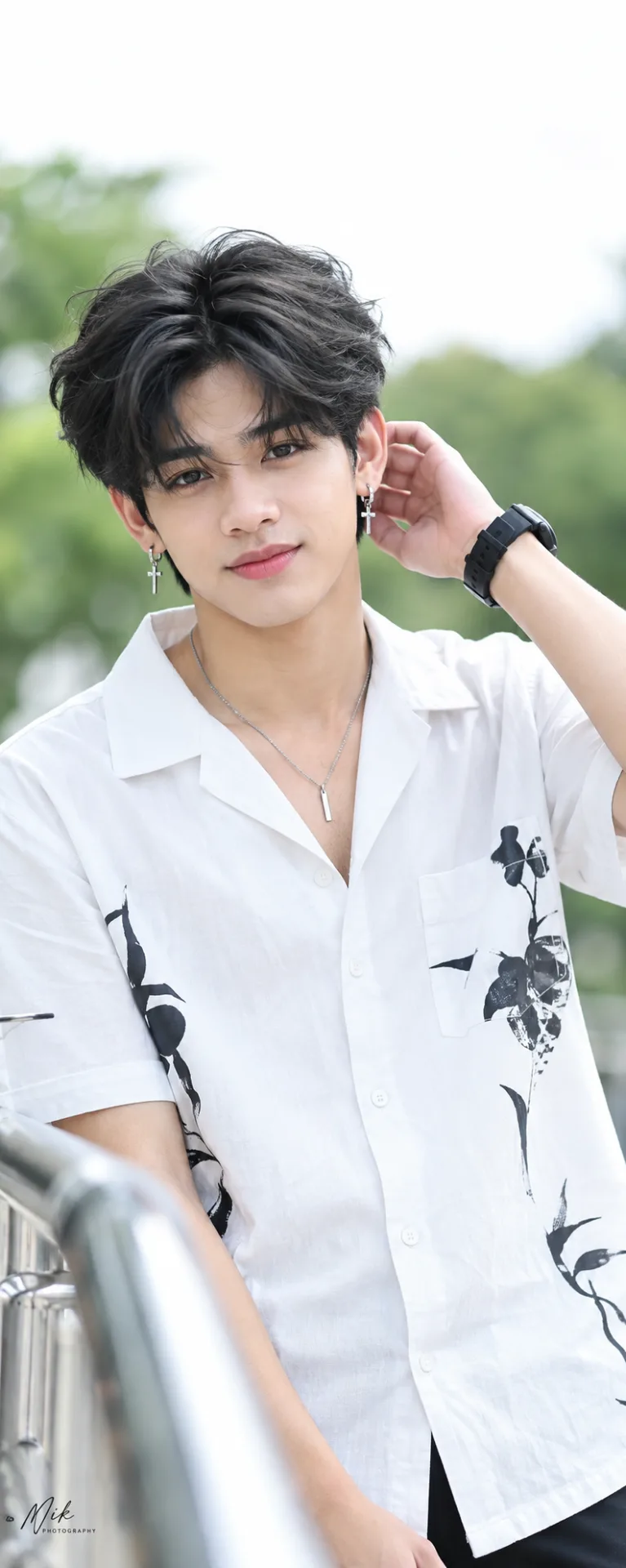
📸✨ Celebrity Editorial Fashion AI Photo Prompt | Soft Daylight Aesthetic
Source: @info_x_nik
This prompt generates 📸✨ Celebrity Editorial Fashion AI Photo Prompt | Soft Daylight Aesthetic.
It is written for ChatGPT.
The prompt specifies close-up.
One variable you can change is Photorealistic look.
How to use this prompt
- Model: ChatGPT.
- Subject: 📸✨ Celebrity Editorial Fashion AI Photo Prompt | Soft Daylight Aesthetic.
- Change Photorealistic look.
0 views · 0 copies · 0 favorites · 0 discussing
0Prompt
1 of 1 free copies left today
aspect ratio 9:16 , Keep the person exactly as shown in the reference image with 100% identical facial features, bone structure, 4K details, has perfect facial details as reference image,
{
"category": "fashion_editorial",
"category_reasoning": "Professional styled portrait characteristic of celebrity press or editorial photography.",
"adaptable": "subject",
"subject": "young Asian male posing with one hand raised to his head, looking directly at the camera with a subtle smile",
"subject_details": "late teens to early twenties, has perfect facial details as reference image, wearing a white short-sleeve button-down shirt with black graphic elements, black wristwatch",
"setting": "outdoor daytime, bright overcast or shaded area",
"setting_details": "blurred green foliage in the background, bright white overexposed sky, out-of-focus metal railing in the foreground left",
"composition": "medium close-up, eye-level angle, shallow depth of field, subject centered, face on upper third intersection",
"camera": "telephoto portrait lens, compressed perspective, very shallow depth of field, smooth bokeh",
"lighting": "soft diffused natural daylight, flat frontal illumination, no harsh shadows, high-key overall exposure, soft catchlights in the upper half of the eyes",
"color_grade": "high-key, cool-daylight, desaturated, pastel-leaning skin tones",
"color_palette": "white, black, soft peach skin tones, muted green",
"style": "editorial portrait, clean beauty, celebrity press photography",
"mood": "approachable, fresh, calm, youthful",
"textures_materials": "matte skin, crisp cotton shirt, metallic jewelry, matte hair",
"post_processing": "skin smoothing, frequency separation, lifted shadows, brightened exposure, watermark in bottom left corner",
"recreation_prompt": "young Asian male posing with one hand raised to his head, looking directly at the camera with a subtle smile, late teens to early twenties, has perfect facial details as reference image, wearing a white short-sleeve button-down shirt with black graphic elements, black wristwatch, medium close-up, eye-level angle, shallow depth of field, blurred green foliage background, soft diffused natural daylight, flat frontal illumination, high-key overall exposure, high-key, cool-daylight, desaturated background, editorial portrait, clean beauty, telephoto portrait lens, compressed perspective, skin smoothing, watermark in bottom left corner, crisp detail, 85mm",
"adaptation_prompt": "[YOUR SUBJECT — describe yourself: appearance, outfit, pose], medium close-up, eye-level angle, shallow depth of field, blurred green foliage background, soft diffused natural daylight, flat frontal illumination, high-key overall exposure, high-key, cool-daylight, desaturated background, editorial portrait, clean beauty, telephoto portrait lens, compressed perspective, skin smoothing, watermark in bottom left corner, crisp detail, 85mm",
"negative_prompt": "harsh shadows, high contrast, oversaturated colors, wide angle distortion, deep depth of field, textured skin, dramatic lighting",
"color_science": "high-key exposure, cool white highlights, peachy skin preservation, lifted midtones, low contrast in shadows, muted background greens",
"filter_name": "Beauty retouching / Press aesthetic",
"filter_description": "skin smoothing, lifted exposure, softened local contrast on skin, high-key brightened whites, lowered saturation in background elements",
"white_balance": "cool daylight",
"color_temperature": "cool, ~5500K-6000K",
"tone_curve": "lifted shadows, brightened midtones, compressed and clipped highlights",
"dynamic_range": "narrow, clipped whites, prioritizing midtone skin exposures",
"highlight_rendering": "clipped in the sky, bright on the shirt, very soft specular highlights on skin",
"shadow_rendering": "soft, lifted, low density, lack of deep blacks in facial features",
"camera_rendering": "clean digital sensor, DSLR or mirrorless",
"lens_rendering": "telephoto compression, shallow depth of field, smooth background bokeh, slight foreground bokeh on railing",
"noise_profile": "very clean, low ISO digital, no visible noise",
"grain_profile": "none visible",
"sharpness_profile": "sharp on eyes, lips, and shirt edges; softened on skin via retouching",
"retouching_analysis": "significant skin smoothing, frequency separation, localized brightening of eyes and face",
"portrait_analysis": "direct gaze, head slightly tilted, hand softly touching Head, relaxed posture",
"facial_expression": "gentle, closed-mouth subtle smile",
"micro_expression": "relaxed brows, soft eye contact, minimal muscle tension",
"skin_rendering": "matte, smoothed texture, no visible pores, soft pinkish-peach undertones",
"hair_rendering": "matte, styled with volume, deep black with soft blue-grey highlight reflections from the sky",
"lighting_analysis": "diffused ambient daylight, flat soft frontal fill, no direct sunlight, soft catchlights at 10 and 2 o'clock",
"visual_style_analysis": "celebrity editorial press photography, clean youth aesthetic"
}
Similar prompts

3D Pop-up Parents Day Card
3D 노트 위 꽃이 입체적으로 피어나는 장면, 첨부된 사진의 미니 캐릭터들이 물주고 가꾸는 모습, {argument name="날씨" default="따뜻한 5월 햇살"}, 캐리커처 스타일, 밝고 사랑스러운 분위기, 실제 꽃처럼 디테일하게,

Chibi Scrapbook Photo Transformation
remove the people around the main character, Add multiple small, cute chibi-style “mini versions” of her around the image.

AI Photo Generation Guide
1. Open Gemini / Grok / GPT Image 2.0 2. Upload your photo 3. Copy the prompt 4. Generate 5. Prompt ⤵️ https://t.co/ufvHABxbuM

Depth in Image Generation
🤯 Images 2.5 is so good at building depth!

AI Sticker-Cutout Photo Effect
How to get this viral sticker-cutout photo effect with AI GPT image 2 on chatgpt Prompt👇 https://t.co/Re6oPaU3zv

Photo made of words
Your photo, but made entirely from words 🤯👇 ① Open Gemini / Grok / GPT Image 2.0 ② Add your photo ③ Paste the prompt ④ Generate.

Photo to Hand-Drawn Art
Turn your photo into a hand-drawn masterpiece ✍️🖤 ① Upload your photo ② Copy this prompt ③ Generate ④ Done.

Rubber Stamp Travel Field Notes Poster
GPT image 2 on chatgpt Prompt👇 Please create a separate "Rubber Stamp Travel Field Notes Poster" for each photo I upload, outputting each

Event Photo Synthesis Illustration
Generate a single illustration based on the school trip photos.

Istanbul Travel Journal Collage
Image created on Gpt 2 Prompt: Ultra-realistic hand-painted watercolor travel collage with soft ink outlines, vintage travel journal

Indian Wedding Invitation Card
"एक भव्य भारतीय डिजिटल वेडिंग इनविटेशन कार्ड (Digital Wedding Invitation Card)। बैकग्राउंड में हल्के गुलाबी और सुनहरे रंग के पर्दे

Cat Ruins Photo
GPT Image 2 on ChatGPT Prompt: Use the uploaded reference image as the primary facial reference.