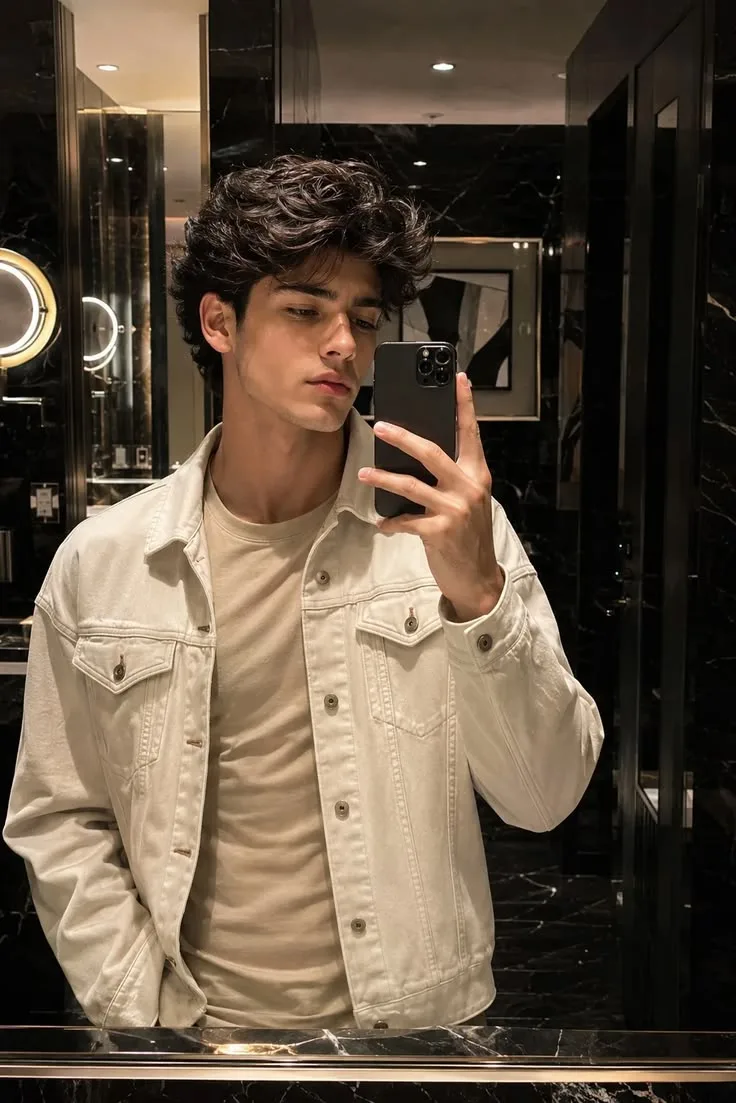
🪞 Cream Jacket Mirror Selfie 🤍
Source: @uikey___creator999
This prompt generates 🪞 Cream Jacket Mirror Selfie 🤍.
It is written for ChatGPT.
The prompt specifies 35mm.
One variable you can change is Photorealistic look.
How to use this prompt
- Model: ChatGPT.
- Subject: 🪞 Cream Jacket Mirror Selfie 🤍.
- Change Photorealistic look.
0 views · 0 copies · 0 favorites · 0 discussing
0Prompt
1 of 1 free copies left today
{
  "image_design": {
    "type": "luxury_bathroom_mirror_selfie",
    "aspect_ratio": "4:5",
    "style": "photorealistic, cinematic, premium fashion editorial",

    "subject": {
      "gender": "male",
      "age_appearance": "young adult",
      "pose": "standing in front of a large bathroom mirror",
      "expression": "calm, serious and relaxed",
      "gaze": "looking slightly downward toward the phone",
      "right_hand": "holding smartphone in front of face",
      "left_hand": "resting casually near trouser pocket",
      "framing": "upper body to waist"
    },

    "hair": {
      "color": "dark brown/black",
      "style": "thick voluminous messy wavy hair",
      "length": "medium",
      "texture": "natural curls and loose waves",
      "front": "soft textured strands falling toward forehead",
      "finish": "slightly glossy natural texture"
    },

    "outfit": {
      "jacket": {
        "type": "oversized denim trucker jacket",
        "color": "off-white / cream",
        "material": "cotton denim",
        "fit": "relaxed oversized",
        "details": "two chest flap pockets, visible stitching, metal buttons"
      },
      "inner_shirt": {
        "type": "plain crew-neck t-shirt",
        "color": "beige / light taupe",
        "fit": "regular relaxed fit"
      }
    },

    "smartphone": {
      "type": "modern premium smartphone",
      "color": "matte black",
      "case": "dark black case",
      "camera": "triple-lens camera module",
      "orientation": "vertical",
      "position": "held in right hand in front of mirror"
    },

    "environment": {
      "location": "luxury modern bathroom",
      "walls": "black polished marble",
      "mirror": "large frameless rectangular mirror",
      "counter": "dark black marble vanity",
      "lighting": "warm recessed ceiling lights",
      "left_side": "round illuminated vanity mirror/light visible in reflection",
      "background": "dark glossy marble with subtle white veining",
      "decor": "minimal premium hotel-style bathroom",
      "overall_mood": "luxurious, dark, warm and sophisticated"
    },

    "lighting": {
      "type": "warm indoor luxury lighting",
      "key_light": "soft warm ceiling downlights",
      "highlights": "subtle highlights on hair and jacket",
      "shadows": "soft natural shadows",
      "skin_lighting": "warm and realistic",
      "contrast": "medium-high cinematic contrast"
    },

    "composition": {
      "orientation": "vertical",
      "subject_position": "center",
      "mirror_reflection": "clear and realistic",
      "camera_angle": "eye-level mirror selfie",
      "foreground": "black marble vanity visible along bottom edge",
      "background": "symmetrical dark marble bathroom",
      "visual_focus": "face, textured hair, cream jacket and mirror reflection"
    },

    "camera": {
      "style": "high-end smartphone photography",
      "lens_look": "approximately 35mm equivalent",
      "focus": "sharp face and clothing details",
      "depth_of_field": "moderate",
      "image_quality": "high resolution",
      "realism": "natural photographic detail"
    },

    "color_palette": {
      "dominant": [
        "black",
        "cream",
        "off-white",
        "beige",
        "warm gold",
        "dark brown"
      ],
      "contrast": "high",
      "saturation": "slightly muted",
      "tone": "warm luxury cinematic"
    },

    "overall_aesthetic": "luxury hotel bathroom mirror selfie, Korean-inspired mens fashion, cream denim jacket, messy wavy hair, dark marble interior, warm cinematic lighting",

    "negative_prompt": [
      "cartoon",
      "anime",
      "illustration",
      "plastic skin",
      "over-smoothed face",
      "distorted hands",
      "extra fingers",
      "duplicate phone",
      "warped mirror reflection",
      "incorrect clothing",
      "bright colorful bathroom",
      "low resolution",
      "blurred face",
      "overexposure",
      "text",
      "watermark",
      "logo"
    ]
  },
Similar prompts

3D Pop-up Parents Day Card
3D 노트 위 꽃이 입체적으로 피어나는 장면, 첨부된 사진의 미니 캐릭터들이 물주고 가꾸는 모습, {argument name="날씨" default="따뜻한 5월 햇살"}, 캐리커처 스타일, 밝고 사랑스러운 분위기, 실제 꽃처럼 디테일하게,

Chibi Scrapbook Photo Transformation
remove the people around the main character, Add multiple small, cute chibi-style “mini versions” of her around the image.

AI Photo Generation Guide
1. Open Gemini / Grok / GPT Image 2.0 2. Upload your photo 3. Copy the prompt 4. Generate 5. Prompt ⤵️ https://t.co/ufvHABxbuM

Depth in Image Generation
🤯 Images 2.5 is so good at building depth!

AI Sticker-Cutout Photo Effect
How to get this viral sticker-cutout photo effect with AI GPT image 2 on chatgpt Prompt👇 https://t.co/Re6oPaU3zv

Photo made of words
Your photo, but made entirely from words 🤯👇 ① Open Gemini / Grok / GPT Image 2.0 ② Add your photo ③ Paste the prompt ④ Generate.

Photo to Hand-Drawn Art
Turn your photo into a hand-drawn masterpiece ✍️🖤 ① Upload your photo ② Copy this prompt ③ Generate ④ Done.

Rubber Stamp Travel Field Notes Poster
GPT image 2 on chatgpt Prompt👇 Please create a separate "Rubber Stamp Travel Field Notes Poster" for each photo I upload, outputting each

Event Photo Synthesis Illustration
Generate a single illustration based on the school trip photos.

Istanbul Travel Journal Collage
Image created on Gpt 2 Prompt: Ultra-realistic hand-painted watercolor travel collage with soft ink outlines, vintage travel journal

Indian Wedding Invitation Card
"एक भव्य भारतीय डिजिटल वेडिंग इनविटेशन कार्ड (Digital Wedding Invitation Card)। बैकग्राउंड में हल्के गुलाबी और सुनहरे रंग के पर्दे

Cat Ruins Photo
GPT Image 2 on ChatGPT Prompt: Use the uploaded reference image as the primary facial reference.