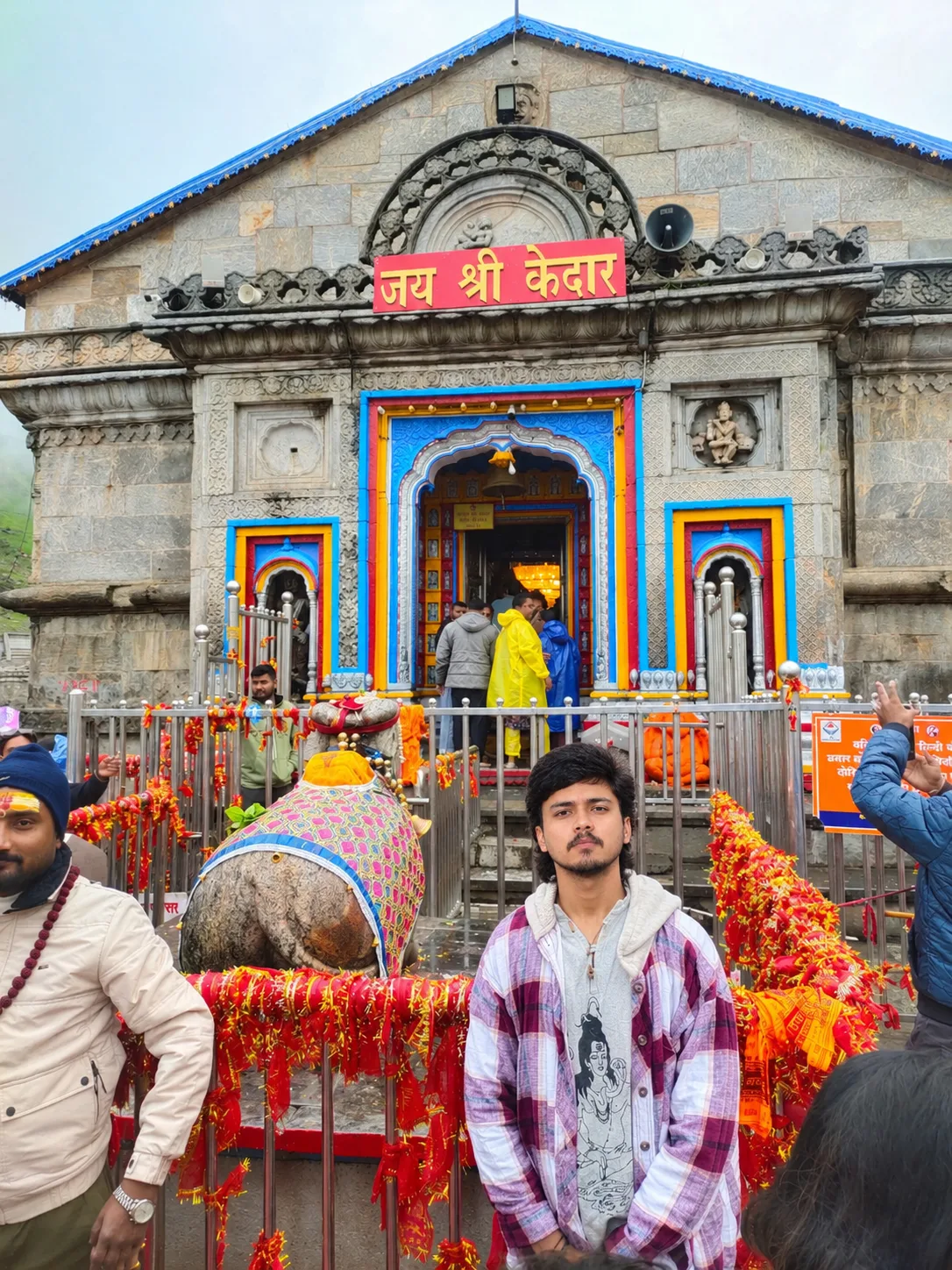
Jai Shri Kedar – Kedarnath Temple Darshan Portrait
Source: @shiva_ji_0011
This prompt generates Jai Shri Kedar – Kedarnath Temple Darshan Portrait.
It is written for ChatGPT.
One variable you can change is Photorealistic look.
How to use this prompt
- Model: ChatGPT.
- Subject: Jai Shri Kedar – Kedarnath Temple Darshan Portrait.
- Change Photorealistic look.
0 views · 0 copies · 0 favorites · 0 discussing
0Prompt
1 of 1 free copies left today
Use the uploaded image as the main reference. Create a highly realistic, cinematic travel portrait at Shri Kedarnath Temple in the Himalayan mountains. Preserve the subject’s exact facial identity, hairstyle, facial features, expression, body proportions, pose, and overall appearance from the reference image.

Place the young man naturally in the foreground, standing confidently in front of the historic Kedarnath Temple. Keep the ancient stone temple architecture, intricate carvings, colorful blue/yellow/red doorway decorations, “जय श्री केदार” sign, decorated railings, sacred bull statue, devotees, and Himalayan surroundings clearly visible.

Maintain his casual winter outfit: light grey hoodie/T-shirt underneath a purple-and-white checked overshirt. Keep the clothing realistic and naturally fitted without changing its design.

Create a premium photorealistic pilgrimage travel photograph, natural Himalayan daylight, soft overcast mountain atmosphere, realistic skin texture, sharp facial details, authentic stone textures, natural depth of field, cinematic composition, balanced exposure, vibrant but realistic colors, professional travel photography, ultra-detailed, 4K/8K quality.

Important: Preserve the original temple and subject composition as much as possible. Do not change the subject’s identity or facial structure. Do not add unrealistic objects, excessive beauty retouching, artificial skin smoothing, or distorted hands/fingers.
Similar prompts

3D Pop-up Parents Day Card
3D 노트 위 꽃이 입체적으로 피어나는 장면, 첨부된 사진의 미니 캐릭터들이 물주고 가꾸는 모습, {argument name="날씨" default="따뜻한 5월 햇살"}, 캐리커처 스타일, 밝고 사랑스러운 분위기, 실제 꽃처럼 디테일하게,

Chibi Scrapbook Photo Transformation
remove the people around the main character, Add multiple small, cute chibi-style “mini versions” of her around the image.

AI Photo Generation Guide
1. Open Gemini / Grok / GPT Image 2.0 2. Upload your photo 3. Copy the prompt 4. Generate 5. Prompt ⤵️ https://t.co/ufvHABxbuM

Depth in Image Generation
🤯 Images 2.5 is so good at building depth!

AI Sticker-Cutout Photo Effect
How to get this viral sticker-cutout photo effect with AI GPT image 2 on chatgpt Prompt👇 https://t.co/Re6oPaU3zv

Photo made of words
Your photo, but made entirely from words 🤯👇 ① Open Gemini / Grok / GPT Image 2.0 ② Add your photo ③ Paste the prompt ④ Generate.

Photo to Hand-Drawn Art
Turn your photo into a hand-drawn masterpiece ✍️🖤 ① Upload your photo ② Copy this prompt ③ Generate ④ Done.

Rubber Stamp Travel Field Notes Poster
GPT image 2 on chatgpt Prompt👇 Please create a separate "Rubber Stamp Travel Field Notes Poster" for each photo I upload, outputting each

Event Photo Synthesis Illustration
Generate a single illustration based on the school trip photos.

Istanbul Travel Journal Collage
Image created on Gpt 2 Prompt: Ultra-realistic hand-painted watercolor travel collage with soft ink outlines, vintage travel journal

Indian Wedding Invitation Card
"एक भव्य भारतीय डिजिटल वेडिंग इनविटेशन कार्ड (Digital Wedding Invitation Card)। बैकग्राउंड में हल्के गुलाबी और सुनहरे रंग के पर्दे

Cat Ruins Photo
GPT Image 2 on ChatGPT Prompt: Use the uploaded reference image as the primary facial reference.