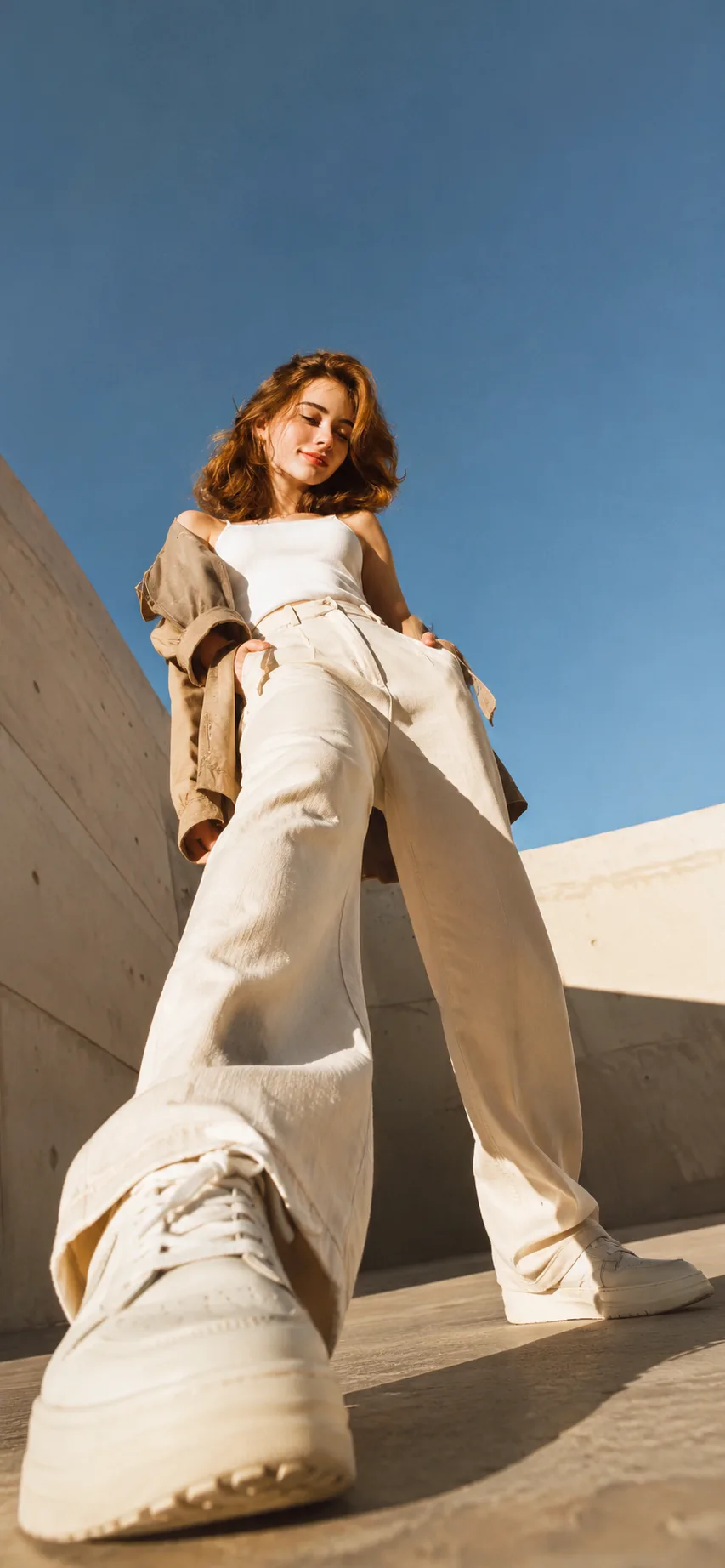
Sunlit Skyward Street Style
Source: @rehman
This prompt generates Sunlit Skyward Street Style.
It is written for ChatGPT.
The prompt specifies 16mm.
One variable you can change is Photorealistic look.
How to use this prompt
- Model: ChatGPT.
- Subject: Sunlit Skyward Street Style.
- Change Photorealistic look.
0 views · 0 copies · 0 favorites · 0 discussing
0Prompt
1 of 1 free copies left today
Create a premium, viral Pinterest-style iPhone lock-screen wallpaper using the uploaded reference image(s) as the exact and exclusive identity reference for the character(s).

IDENTITY PRESERVATION:
Preserve every identifiable feature with maximum accuracy, including facial structure, skin tone, hairstyle, hair color, eye shape, eyebrows, nose, lips, body proportions, apparent age, and overall likeness. Do not beautify, redesign, age, de-age, merge, or reinterpret the character(s). The final result must clearly depict the same person or people shown in the reference image(s).

CHARACTER LOGIC:
- If one female reference image is provided, create one female character only and produce a single-character wallpaper.
- If one male and one female reference image are provided, create exactly those two characters as a couple.
- Never add extra people, duplicate characters, background faces, reflections of people, silhouettes, mannequins, or partially visible figures.
- Do not swap, blend, or confuse identities between the references.
- Maintain accurate gender presentation and individual facial identity.

COMPOSITION:
Create a cinematic ultra-wide-angle, worm’s-eye-view composition. Place the camera extremely low on the ground, pointing upward toward the character or couple standing above it. The character(s) should appear powerful, stylish, and visually dominant while remaining anatomically realistic.

PERSPECTIVE:
Use authentic wide-angle lens behavior and realistic perspective distortion. The shoes closest to the camera must appear dramatically oversized in the foreground, with natural foreshortening, accurate depth, realistic scale progression, and physically believable proportions. Keep the face and upper body recognizable despite the low-angle perspective. Avoid unnatural stretching, warped limbs, malformed feet, or exaggerated facial distortion.

POSE AND INTERACTION:
For a single character, create a confident, stylish stance directly above the camera. For a couple, show natural chemistry and coordinated body language while keeping both identities clearly distinguishable. Ensure both characters have complete, anatomically correct bodies and naturally positioned hands, arms, legs, and feet.

FASHION AND STYLING:
Use modern, high-fashion streetwear suitable for a premium social-media wallpaper. Clothing should be stylish, coordinated, realistic, and free from logos, readable brand names, random text, or distracting patterns. Footwear must be visually prominent, detailed, and realistic because it is a major foreground element.

CAMERA AND VISUAL STYLE:
- Ultra-wide-angle lens, approximately 14–16 mm equivalent.
- Extreme low-angle ground-level camera.
- Strong but realistic foreground-to-background depth.
- Dynamic diagonal composition.
- Cinematic perspective.
- High-end editorial fashion photography.
- Photorealistic rendering.
- Natural skin texture.
- Realistic fabric, leather, stitching, and shoe materials.
- Sharp facial identity and clothing details.
- Dramatic but believable lighting.
- Premium contrast, refined color grading, and clean visual hierarchy.
- Subtle depth of field while keeping the character(s) and foreground shoes sufficiently detailed.

BACKGROUND:
Use a clean, visually striking, minimal urban or architectural environment that supports the composition without competing with the character(s). The background should provide depth, atmosphere, and contrast while remaining suitable for an iPhone lock screen. Avoid clutter, crowds, extra figures, distracting signs, watermarks, or text.

IPHONE LOCK-SCREEN DESIGN:
Compose the image vertically in a premium smartphone wallpaper format, ideally 9:19.5 or 1290 × 2796 pixels. Keep important facial features within the central safe area. Leave visually calm negative space near the upper portion for the iPhone clock and notification widgets. Do not place important facial details, hands, or essential design elements directly beneath the clock area.

FINAL QUALITY:
The image must look like a professionally photographed fashion campaign rather than an AI-generated image. Prioritize exact identity preservation, correct anatomy, realistic perspective, natural interaction, strong visual impact, and immediate usability as an iPhone lock-screen wallpaper.

OUTPUT:
Return one finished vertical wallpaper only. Do not include alternate versions, mockups, device frames, captions, typography, watermarks, borders, or explanatory text.
extra people, additional characters, duplicate person, cloned face, merged identities, identity swap, incorrect gender, altered facial features, unrecognizable face, face distortion, asymmetrical eyes, deformed nose, malformed lips, unnatural smile, plastic skin, excessive beauty retouching, wrong hairstyle, changed hair color, incorrect skin tone, extra limbs, missing limbs, fused fingers, deformed hands, malformed feet, twisted ankles, broken anatomy, floating body parts, unnatural pose, impossible joint angles, excessive lens warping, stretched face, melted shoes, distorted sneakers, incorrect perspective, unrealistic scale, flat composition, weak low-angle view, ordinary eye-level camera, cropped head, cropped feet, incomplete body, hidden characters, background people, reflections of people, silhouettes, mannequins, statues, cluttered background, unreadable text, random letters, logos, brand names, watermark, signature, frame, border, phone mockup, low resolution, blur, pixelation, oversharpening, artificial skin, cartoon, illustration, 3D render, anime, fantasy styling, duplicate wallpaper, landscape orientation
Similar prompts

3D Pop-up Parents Day Card
3D 노트 위 꽃이 입체적으로 피어나는 장면, 첨부된 사진의 미니 캐릭터들이 물주고 가꾸는 모습, {argument name="날씨" default="따뜻한 5월 햇살"}, 캐리커처 스타일, 밝고 사랑스러운 분위기, 실제 꽃처럼 디테일하게,

Chibi Scrapbook Photo Transformation
remove the people around the main character, Add multiple small, cute chibi-style “mini versions” of her around the image.

AI Photo Generation Guide
1. Open Gemini / Grok / GPT Image 2.0 2. Upload your photo 3. Copy the prompt 4. Generate 5. Prompt ⤵️ https://t.co/ufvHABxbuM

Depth in Image Generation
🤯 Images 2.5 is so good at building depth!

AI Sticker-Cutout Photo Effect
How to get this viral sticker-cutout photo effect with AI GPT image 2 on chatgpt Prompt👇 https://t.co/Re6oPaU3zv

Photo made of words
Your photo, but made entirely from words 🤯👇 ① Open Gemini / Grok / GPT Image 2.0 ② Add your photo ③ Paste the prompt ④ Generate.

Photo to Hand-Drawn Art
Turn your photo into a hand-drawn masterpiece ✍️🖤 ① Upload your photo ② Copy this prompt ③ Generate ④ Done.

Rubber Stamp Travel Field Notes Poster
GPT image 2 on chatgpt Prompt👇 Please create a separate "Rubber Stamp Travel Field Notes Poster" for each photo I upload, outputting each

Event Photo Synthesis Illustration
Generate a single illustration based on the school trip photos.

Istanbul Travel Journal Collage
Image created on Gpt 2 Prompt: Ultra-realistic hand-painted watercolor travel collage with soft ink outlines, vintage travel journal

Indian Wedding Invitation Card
"एक भव्य भारतीय डिजिटल वेडिंग इनविटेशन कार्ड (Digital Wedding Invitation Card)। बैकग्राउंड में हल्के गुलाबी और सुनहरे रंग के पर्दे

Cat Ruins Photo
GPT Image 2 on ChatGPT Prompt: Use the uploaded reference image as the primary facial reference.