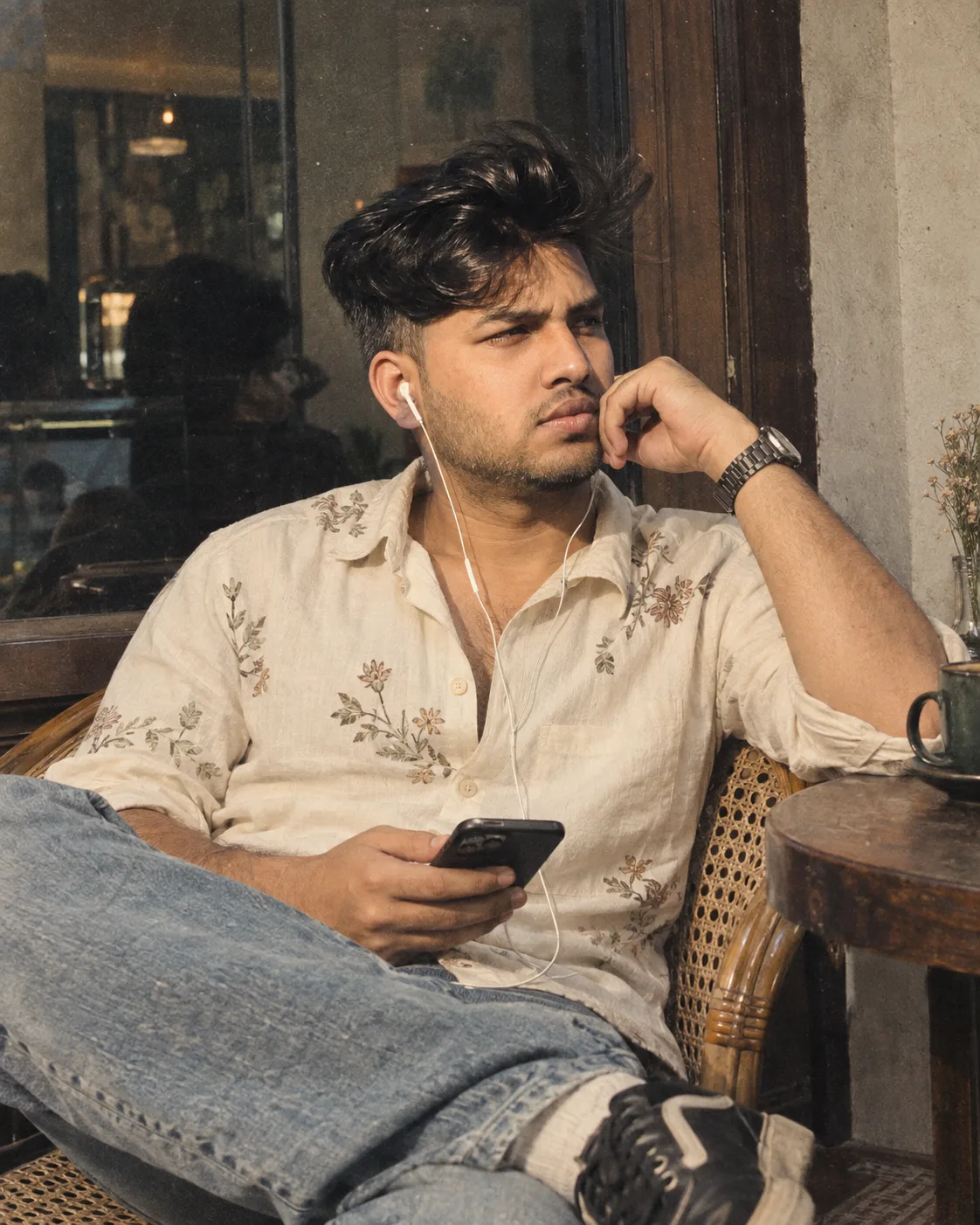
Vintage Café Portrait with Retro Grain
Source: @musha448
This prompt generates Vintage Café Portrait with Retro Grain.
It is written for ChatGPT.
One variable you can change is Photorealistic look.
How to use this prompt
- Model: ChatGPT.
- Subject: Vintage Café Portrait with Retro Grain.
- Change Photorealistic look.
0 views · 0 copies · 0 favorites · 0 discussing
0Prompt
1 of 1 free copies left today
Use the uploaded image as the PRIMARY VISUAL REFERENCE and recreate the image as closely as possible. Create a highly realistic, intimate vintage lifestyle photograph of a young Indian man casually seated in a woven cane café chair indoors.

Match the reference image very closely in pose, body positioning, camera angle, framing, composition, clothing, environment, lighting, colour combination, shadows, grain, mood and overall photographic aesthetic.

The subject is seated in a relaxed, slightly reclined position in a woven rattan/cane chair. His upper body leans naturally toward the right side of the frame. One elbow is raised and supported comfortably, with his hand resting near his cheek and jaw in a thoughtful, relaxed pose. His other hand rests naturally lower in the frame while holding a modern smartphone. Recreate the natural positioning of both arms and hands from the reference.

His head is turned toward the right, looking away from the camera with a calm, slightly thoughtful expression. Preserve the intimate candid quality of the pose rather than making it look like a formal portrait.

Use the same hairstyle shown in the reference image. Preserve the thick, curly/wavy dark hair, medium length, dense natural volume, slightly messy texture and defined curls falling naturally across the forehead. The hairstyle must naturally connect to the head and face.

If a separate face reference is provided, use ONLY the facial identity from that uploaded face image. Preserve the exact recognisable facial identity, facial structure, skin tone, facial proportions, eyes, nose, lips, jawline and other defining facial characteristics. Do not copy the face identity of the person in the main reference image. Naturally reconstruct and integrate the face with the head, hair, ears, neck and body so the final image looks like one real person naturally photographed in this environment, with no pasted-face or face-swap appearance.

Subject height: 6 feet (183 cm), with realistic natural body proportions.

Recreate the clothing closely: an off-white/cream casual button-down shirt with delicate muted floral embroidery or botanical detailing distributed subtly across the fabric. Keep the shirt slightly loose and relaxed, with several upper buttons open, naturally exposing a small amount of the chest. Preserve realistic fabric texture, wrinkles and folds.

Pair the shirt with light blue relaxed-fit jeans. One leg is positioned casually toward the foreground, creating the same relaxed seated composition. Include a pair of dark retro-style sneakers with light detailing, naturally positioned and proportionate.

Include wired white earphones, with the wire naturally extending from the ear down across the shirt and toward the phone. Make the cable physically realistic and correctly connected.

Include a realistic modern smartphone naturally held in the lower hand. Preserve realistic finger placement around the phone, with no distorted or duplicated fingers.

The subject should wear a dark metal wristwatch on the raised wrist, matching the understated casual styling of the reference.

Recreate the surrounding environment: an intimate, slightly worn indoor café or restaurant setting with a large dark reflective window or glass panel behind the subject, muted wooden framing, a textured pale wall on the right, and a small round dark wooden café table beside the chair. Include subtle reflections in the glass and understated background elements without distracting from the subject.

The woven cane chair should be highly realistic, with detailed natural rattan texture, curved wooden/cane construction and authentic woven patterns. Preserve its position and visual prominence along the right side of the frame.

Use soft, slightly directional indoor lighting with a subtle warm-neutral illumination on the subject. Maintain the reference's muted teal, cream, beige and brown colour palette, with slightly cool shadows and warm skin tones.

Most importantly, recreate the reference's authentic vintage analogue-film aesthetic. Add visible but tasteful film grain, subtle dust-like texture, slight softness, muted contrast, gentle colour fading, mild film noise and natural photographic imperfections. The image should feel like a candid photograph taken on an older film camera rather than a perfectly clean modern digital photograph.

Maintain the close, vertically framed composition with the subject filling most of the frame. Keep the camera perspective natural and slightly intimate, with realistic lens characteristics and subtle depth of field.

Do not reproduce the Meta AI watermark or any other watermark, logo or unnecessary text visible in the reference.

Image dimension: 1122 × 1402 px.

Negative instructions: no pasted-face appearance, no face-swap artifacts, no cut-out face, no overlay effect, no mismatched skin tone, no mismatched lighting, no incorrect facial identity, no incorrect hairstyle, no inconsistent facial features, no distorted anatomy, no extra fingers, no malformed hands, no duplicated limbs, no extra arms or legs, no unnatural joints, no distorted phone, no unrealistic earphone cable, no floating objects, no warped chair, no distorted watch, no plastic skin, no waxy skin, no excessive skin smoothing, no CGI appearance, no modern ultra-clean digital look, no excessive HDR, no oversaturated colours, no artificial film effect, no random text, no watermark, no obvious AI artifacts.
Similar prompts

3D Pop-up Parents Day Card
3D 노트 위 꽃이 입체적으로 피어나는 장면, 첨부된 사진의 미니 캐릭터들이 물주고 가꾸는 모습, {argument name="날씨" default="따뜻한 5월 햇살"}, 캐리커처 스타일, 밝고 사랑스러운 분위기, 실제 꽃처럼 디테일하게,

Chibi Scrapbook Photo Transformation
remove the people around the main character, Add multiple small, cute chibi-style “mini versions” of her around the image.

AI Photo Generation Guide
1. Open Gemini / Grok / GPT Image 2.0 2. Upload your photo 3. Copy the prompt 4. Generate 5. Prompt ⤵️ https://t.co/ufvHABxbuM

Depth in Image Generation
🤯 Images 2.5 is so good at building depth!

AI Sticker-Cutout Photo Effect
How to get this viral sticker-cutout photo effect with AI GPT image 2 on chatgpt Prompt👇 https://t.co/Re6oPaU3zv

Photo made of words
Your photo, but made entirely from words 🤯👇 ① Open Gemini / Grok / GPT Image 2.0 ② Add your photo ③ Paste the prompt ④ Generate.

Photo to Hand-Drawn Art
Turn your photo into a hand-drawn masterpiece ✍️🖤 ① Upload your photo ② Copy this prompt ③ Generate ④ Done.

Rubber Stamp Travel Field Notes Poster
GPT image 2 on chatgpt Prompt👇 Please create a separate "Rubber Stamp Travel Field Notes Poster" for each photo I upload, outputting each

Event Photo Synthesis Illustration
Generate a single illustration based on the school trip photos.

Istanbul Travel Journal Collage
Image created on Gpt 2 Prompt: Ultra-realistic hand-painted watercolor travel collage with soft ink outlines, vintage travel journal

Indian Wedding Invitation Card
"एक भव्य भारतीय डिजिटल वेडिंग इनविटेशन कार्ड (Digital Wedding Invitation Card)। बैकग्राउंड में हल्के गुलाबी और सुनहरे रंग के पर्दे

Cat Ruins Photo
GPT Image 2 on ChatGPT Prompt: Use the uploaded reference image as the primary facial reference.